
How Long Does Vue 3 Migration Take?

Quick answer: After inventory, plan on about 2–6 weeks for a small, well-tested Vue app, 6–16 weeks for a medium production app and 4–9+ months for a large Vue or Nuxt product.
You plan for a month. The first update goes fine. Then the surprises show up: add-ons that only work with Vue 2, shared data code nobody owns and pages that need rework.
That is how a simple upgrade becomes a release risk. These are VueSquad planning bands, shaped by our Vue/Nuxt scoping model. Use them as a starting point, then tighten the plan after inventory.
Written by Sudipto Mondal, Senior Software Engineer at VueSquad. Sudipto is a full-stack developer with 5+ years of experience in SaaS platforms, eCommerce systems and custom software.
The short answer: plan by app size and Vue-specific risk
You need a timeline your product team can staff, not a guess based on lines of code.
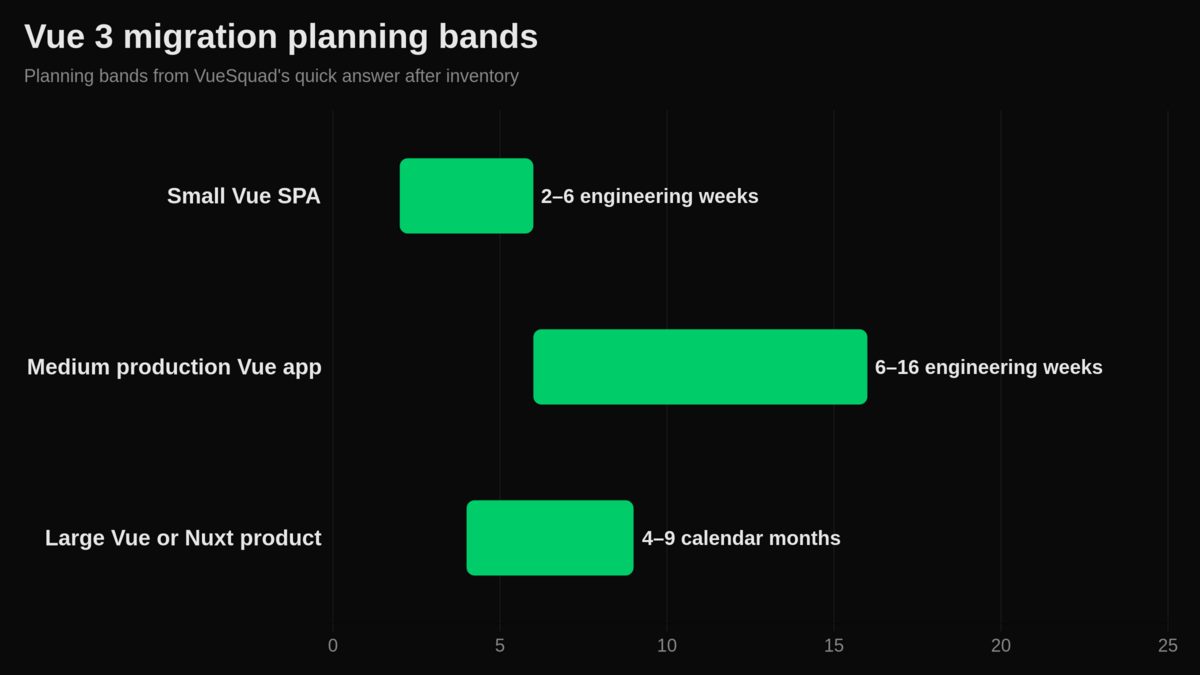
Official Vue docs explain tools and breaking changes. They do not promise one duration for every app. We group Vue migrations by component count, dependency risk and release shape before we assign engineers.
| Scope | Typical inputs | Main blockers | Recommended delivery style |
|---|---|---|---|
| Small Vue SPA | Few routes, light state, few third-party packages, solid regression tests | One incompatible plugin, build tooling drift, hidden browser bugs | In-place migration with a short stabilization window |
| Medium production Vue app | Many components, Vue Router, Vuex modules, UI library, analytics, auth flows | UI-library replacement, weak tests, old Vue CLI or custom webpack | Staged migration with owned workstreams |
| Large Vue or Nuxt product | SSR, server code, modules, custom plugins, complex permissions, active feature work | Nuxt architecture changes, module gaps, release coordination, QA load | Incremental program with release gates |
One engineer's week is not always one calendar week
If one engineer works only on the migration for a week, that is one focused week of work. The calendar can still stretch because code review, QA, product answers and release windows take time too.
Example: say your app lands in the medium band. One senior engineer may spend most of a quarter on it. Two engineers can shorten that, but they still wait on product decisions, test fixes and deployment reviews.
When to add contingency
Add contingency when the app relies on Vue 2-only packages, lacks end-to-end coverage or uses Nuxt SSR heavily. Vue is past its official Vue 2 support window; Vue’s FAQ names December 31, 2023 as the date official support ended for Vue 2 in its support policy answer.
Estimate dependencies first, tests second and files third. Lines of code matter only after you know what must be replaced.
A useful example is Craft Music, a content-heavy marketing site with teacher profiles, city landing pages, articles, testimonials and lesson-request forms. We moved it from Nuxt 2.15 and Vue 2 to Nuxt 3.10 and Vue 3.4 with one VueSquad engineer, while the client’s developer reviewed and merged work and the client kept editing CMS content.
Before migration, the app had 42 pages, 26 components, 6 layouts, 10 plugins, 263 content files, about 510 media files and about 6,700 lines of code. After migration, it had 38 pages, 38 components, 1 plugin, 272 content files and about 6,900 lines of code.
The work took about one week. Commits ran from February 20 to March 1, 2024, the branch was merged on February 27 and February 29, and final fixes landed on March 5.
The biggest blocker was Nuxt Content v1 to v2 markdown rendering. Thirteen of 63 developer commits in that period went into removing document-driven mode, dropping the content string renderer and switching to markdown-it with v-html for bios, intros and testimonials.
The next issue was prerendering and hydration. Six commits went into that path before all pages prerendered on February 29. The client also published CMS content to main, so main had to be merged into the migration branch several times.
What changes in Vue 3 that affects the estimate
The migration gets longer when your app depends on Vue 2 behavior instead of ordinary component code.
The Vue 3 migration build is a Vue 3 build with Vue 2-compatible behavior and runtime warnings for changed or deprecated features. It runs in Vue 2 mode by default, and you can tune compatibility per component.
That makes it useful for finding real blockers in a running app. It does not remove the need to fix them.
Use the migration build to find real compatibility issues
The official migration flow starts with tooling updates. That includes Vue 3.1, matching @vue/compat, @vue/compiler-sfc in place of vue-template-compiler and vue-loader ^16.0.0 for custom webpack setups.
One common breaking change is the global Vue API. Vue 3 moves app-wide APIs to the app instance, and Vue.use() is replaced by app-level installation.
// Vue 2
import Vue from 'vue'
import App from './App.vue'
import router from './router'
import AnalyticsPlugin from './plugins/analytics'

Vue.use(AnalyticsPlugin, { key: 'public-key' })

new Vue({
  router,
  render: h => h(App)
}).$mount('#app')
// Vue 3
import { createApp } from 'vue'
import App from './App.vue'
import router from './router'
import AnalyticsPlugin from './plugins/analytics'

const app = createApp(App)

app.use(router)
app.use(AnalyticsPlugin, { key: 'public-key' })
app.mount('#app')
That change looks small. In a mature app, it can touch analytics, feature flags, auth, i18n, error reporting and internal plugins.
Do not turn this into a full Composition API rewrite
Moving to Vue 3 does not force every component into Composition API on day one. If an Options API component works and is not blocking migration, leave it alone.
Fix compile-time errors first. Then handle runtime warnings, emitted events, filters, directives, async components and build tooling.
If you also move Vue CLI to Vite, treat that as separate scope. The official Vue documentation states that Vue CLI is now in maintenance. It is no longer recommended for new projects, and Vite is the recommended build toolchain for Vue 3 work in the migration recommendations.
The checklist that turns a guess into a Vue migration estimate
A good estimate starts with inventory. You cannot plan the migration if you do not know which packages and flows control the risk.
Before promising a date, count what can break. Use this checklist when you scope the work. If you need support for the implementation path, start with our Vue 2 to Vue 3 migration planning.
| Area | What to count | Risk signal | Planning action |
|---|---|---|---|
| Routes | Public pages, auth-only pages, admin pages, redirects | SEO pages or permission-heavy routes | Add regression tests before migration |
| Components | Shared UI, forms, modals, tables, charts | Many wrappers around a Vue 2 UI library | Decide replace, wrap or defer |
| State | Vuex modules, persisted state, cross-tab sync | Modules with no owner or tests | Assign ownership before code changes |
| Plugins | Auth, analytics, i18n, flags, error reporting | Global install patterns and old Vue API usage | Port plugin setup early |
| Directives and filters | Custom directives, global filters | Used across templates | Replace before component work |
| Build tooling | Vue CLI, webpack config, loaders, aliases | Custom webpack or old loader chain | Create a build-tool workstream |
| Tests | Unit, component, browser, SSR checks | Core revenue flows lack coverage | Add tests before migration touches them |
Score risk before promising a date
Low risk means most dependencies support Vue 3, tests cover key flows and the app has little custom infrastructure. Medium risk means a UI library, Vuex modules or build tooling need planned changes.
High risk means Nuxt SSR, old plugins, missing tests and active feature work collide. Ask one hard question: can the team pause changes in the files being migrated?
If not, you need branch ownership, merge rules and smaller pull requests. Scope the work before asking for outside Vue 3 migration help.
We do not assign engineers until we know these answers:
- Current Vue 2 version.
- Total pages and routes.
- Approximate number of components.
package.jsonand dependency list.- Build setup: Vue CLI, webpack, Nuxt or another setup.
- UI library: Vuetify, BootstrapVue, Element UI, custom components or another option.
- State management: Vuex or another store.
- Major third-party Vue 2 plugins and packages.
- JavaScript or TypeScript.
- Existing unit and E2E tests, plus coverage of core flows.
- Custom directives, mixins, filters, event bus or other Vue 2-specific code.
- Required browser support.
- App shape: SPA, SSR/Nuxt or another setup.
- Whether functionality and UI must remain exactly the same.
- Whether scope is migration only, or also Vite, Pinia, Composition API,
<script setup>, refactoring and dependency upgrades. - Repository access for a technical audit.
The most important question is simple: do you want a Vue 3 compatibility migration or a full modernization? That single answer can change staffing and timeline more than the component count.
Nuxt 2 to Nuxt 3 usually takes longer than Vue-only
Nuxt migrations need a bigger plan because you are changing framework architecture, not only component behavior. For Nuxt-specific staffing and scoping, use our Nuxt migration support.
Nuxt describes Nuxt 3 as a complete rewrite of Nuxt 2. The migration can include Vue 2 to Vue 3, Composition API and script setup, build-tool changes, server architecture and Nitro.
| Workstream | Vue-only app impact | Nuxt app impact | What to check |
|---|---|---|---|
| Components | Vue 2 syntax and compatibility warnings | Same component work plus framework wrappers | Shared layouts, slots, async components |
| Routing | Vue Router upgrade work | Page filename and route convention changes | Dynamic routes, nested pages, redirects |
| Layouts | App-level component setup | Nuxt layout structure changes | Default layout, auth layouts, error pages |
| Runtime config | App-specific env handling | App-side process.env usage must move | Public and private runtime values |
| Server code | Separate backend or API client work | Nitro output and server directory behavior | API routes, middleware, deployment |
| Modules | Vue plugins and libraries | Nuxt module compatibility | Auth, images, content, analytics |
Use Nuxt Bridge when it reduces release risk
Nuxt Bridge is a forward-compatibility layer for using many Nuxt 3 features in a Nuxt 2 app. The Bridge instructions show Nuxt ^2.17.3 in the setup.
Use Bridge when it lets you land changes gradually and keep releases small. Do not use it as a long-term parking place. It needs an exit plan.
Do not assume @vue/compat solves Nuxt 3 migration
Nuxt’s migration configuration docs say it is not currently possible to use the Vue 3 migration build with Nuxt 3. That changes the estimate for many teams.
Nuxt workstreams include module compatibility, pages and layouts, dynamic route filenames, runtime config, plugins, middleware, server APIs and CommonJS imports. The docs also tell teams to move Vue app process.env usage to useRuntimeConfig.
Estimate Nuxt as a framework migration. If the app has SSR, hydration-sensitive pages or SEO revenue pages, build a calendar plan with rollback controls.
Failure modes that add weeks
Most slips have a clear smell. Name it early, and the fix is cheaper.
Community threads are useful leads, not benchmarks. The same pattern shows up in real product work: the core Vue update is often less risky than UI libraries, plugins, SSR behavior and tests. On products like TaskGrid, where Nuxt, real-time collaboration, custom drag-and-drop, Slack, GitHub and Stripe all meet in one app, you can see why migration risk lives at integration boundaries.
| Symptom | Root cause | How to confirm | Fix |
|---|---|---|---|
| App builds, key screens break | Runtime Vue 2 behavior remains | Run the app with compat warnings and browser tests | Fix warnings by feature area |
| UI migration dominates schedule | Vue 2-only component library | Check Vue 3 support and breaking changes for the library | Replace, wrap or migrate the design system first |
| Nuxt deploy behaves differently | Server output and registration changed | Compare server routes, middleware and deployment logs | Move server code to the Nuxt 3 model |
| Env values disappear in the browser | Nuxt app still reads process.env | Search templates, plugins and composables | Move values to runtime config |
| Feature branches keep conflicting | Migration and product work touch same files | Track conflict rate and pull request age | Assign file ownership and freeze only hot files |
| QA finds bugs after done | Build success was treated as completion | Check tests against checkout, auth, permissions and dashboards | Add release gates and stabilization time |
The build passing is not the finish line
A passing build means the compiler accepted your code. It does not prove SSR output, analytics, permissions, redirects or form edge cases still work.
For Vue-only apps, fix compile-time errors first, then runtime warnings, then browser regressions. For Nuxt, add SSR output, route behavior, runtime config and deployment checks to the same definition of done.
Who should do the migration, and what it costs
Staffing is a delivery decision. Pick the model that matches product risk and your team’s available attention.
 Public hourly rates for senior Vue migration specialists are not reliable enough to use as a benchmark here. Ask each vendor for the same inputs: engineer count, billable hours, rate, QA scope and release support.
| Option | Control model | Best suited to | Main risk | Delivery note |
|---|---|---|---|---|
| In-house team | You own all planning and delivery | Strong product knowledge and available senior engineers | Feature work slows down | Best when tests are strong and dependencies are known |
| Permanent hire | You add long-term capacity | Ongoing Vue or Nuxt roadmap after migration | Hiring lead time | Works when migration is part of a wider staffing plan |
| Freelancer | You manage one external specialist | Small, well-scoped workstreams | Continuity and availability | Keep architecture ownership in-house |
| Staff augmentation | External engineer joins your workflow | Teams with a lead but not enough hands | You still own prioritization | Good fit for implementation-heavy migration |
| Specialist Vue/Nuxt team | External Vue/Nuxt capacity plus migration experience | Nuxt, SSR, weak tests or dependency risk | Requires clear vendor governance | Use when mistakes would delay core product work |
| Generalist agency | External delivery team | Migration tied to design, backend or product rebuild | Less Vue/Nuxt depth | Ask who owns Vue-specific decisions |
| Stay on current version | You defer the migration | Short-term freeze or sunset path | Dependency and security pressure grows | Set a revisit date |
| Rewrite | New target app with parity scope | Product architecture must change beyond Vue | Hidden behavior gets missed | Define parity before coding |
Use plain formulas:
Monthly cost = engineers × monthly rate
External project cost = engineers × billable hours × rate
Calendar duration = focused work ÷ available focused capacity, adjusted for review, QA and release windows
Use your own team when product knowledge matters most
Your team knows the strange parts: permission rules, old customer configs, analytics events and admin flows. If they have Vue 3 experience and can protect migration time, in-house can be the safest choice.
The danger is context switching. A migration that shares owners with feature work often dies by small conflicts.
Bring in senior Vue help when capacity or migration experience is the bottleneck
VueSquad is one option for teams that need senior Vue and Nuxt engineers inside their existing workflow. Engineers work in your GitHub, GitLab, Linear, Jira and Slack setup.
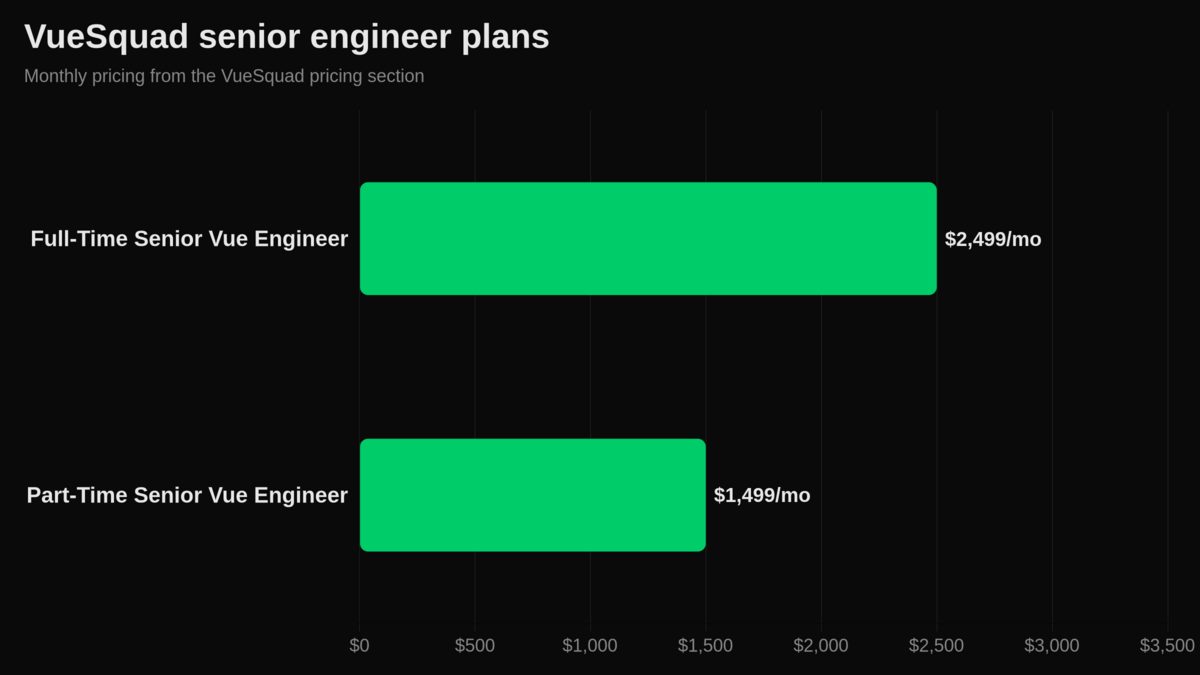
VueSquad’s Full-Time Senior Vue Engineer plan is $2,499 per month for 160 hours per month. The Part-Time Senior Vue Engineer plan is $1,499 per month for 80 hours per month.
Every plan has monthly billing, a flat rate, no onboarding fees and no minimum commitment. You can pause or cancel anytime, clients meet and approve the engineer before onboarding, and teams start within 48 hours in most cases. See VueSquad pricing and engagement models.
If you need multiple engineers, the Dedicated Vue Squad has custom pricing, engineering-lead oversight, shared architecture and coding standards, sprint planning and weekly reporting.
A practical Vue 3 migration plan for your next sprint
The next sprint should reduce uncertainty, not create a giant branch nobody can review.
Pick the migration shape before writing code
Choose one of three shapes:
- In-place migration for small Vue apps with compatible dependencies.
- Staged migration for most production Vue apps and eligible Nuxt 2 apps.
- Rewrite only when product architecture must change beyond Vue.
A rewrite feels clean. It also hides parity risk: SEO, analytics, browser quirks, permissions, error states and admin behavior.
Our senior Vue engineers usually migrate in place when the app is stable, the architecture is still healthy and most dependencies have Vue 3 paths. That keeps product behavior visible and reduces parity risk.
Start fresh with Vue 3 or Nuxt 3 when the app has heavy technical debt, outdated libraries, poor structure or the migration would touch most of the code anyway. In that case, the migration is already a rebuild; call it that before you estimate it.
Ship migration work in reviewable slices
Use this sprint plan:
- Run the inventory and risk score.
- Define parity: routes, flows, SSR output, analytics, permissions and deployment.
- Create the migration branch and freeze only files with migration ownership.
- Turn on the migration build for Vue-only apps where it applies.
- Fix compile-time errors first, then runtime warnings.
- Regression test core flows, SSR output, analytics, permissions and deployment.
- Release behind normal rollback controls.
- Stabilize before starting optional refactors.
Plan your next move
If your app is small and well-tested, start with the inventory and run the migration in tight pull requests. If your product has Nuxt, SSR, a Vue 2 UI library or weak regression coverage, build a staged plan before changing packages.
For senior help inside your existing workflow, start by listing the risks you need covered. Then talk to VueSquad about your migration plan when you know where your team needs support.
Frequently asked questions
What do developers on Reddit say about Vue 3 migration timelines?
They often describe the same pattern: the core Vue change may be smaller than the long tail around UI libraries, plugins, tests and Nuxt work. Treat those threads as leads, then use the scope table above to separate work from calendar delivery.
Is the Vue 2 to Vue 3 migration painful?
It can be, but the pain usually comes from dependencies and missing tests, not Vue syntax alone. UI libraries, global plugins, filters, custom directives and old build setups create most of the long tail.
Has anyone moved a large scale project from Vue 2 to Vue 3?
Yes, teams discuss large migrations in community threads, and the common pattern is staged work rather than one massive flip. For large products, plan ownership, release gates and regression coverage before changing components.
What is the difference between Vue 2 and Vue 3?
For migration planning, the key difference is the app-instance model, changed global APIs, compatibility rules and access to Composition API patterns. In Nuxt apps, the difference expands into routing, layouts, runtime config, server architecture and build tooling.
How do you install Vue 3?
Vue’s docs use npm create vue@latest for creating a new Vue app. For a migration, do not start with a fresh install unless you have chosen a rewrite or parallel rebuild.
Can I use the Vue 3 migration build with Nuxt 3?
No. Nuxt’s docs say Nuxt 3 cannot currently use the Vue 3 migration build. Use Nuxt Bridge for eligible staged Nuxt 2 work, and plan the Nuxt 3 move around framework workstreams.