

Case Study·SaaS Platform·Print-on-demand

We built Render Engine, a mockup SaaS with a WebGL editor and three Nuxt apps. We can build yours.

Designers build product mockup templates in a fabric.js + three.js editor. Sellers upload artwork. A headless-Chromium worker on AWS Lambda replays the same warp, crop and blend on the server and returns a high-resolution file. Our senior Vue and Nuxt engineers built all of it.

  • Vue 3.5
  • Nuxt 3 & 4
  • Pinia
  • PrimeVue 4
  • Tailwind 4
  • fabric.js
  • three.js
  • NestJS
  • AWS Lambda
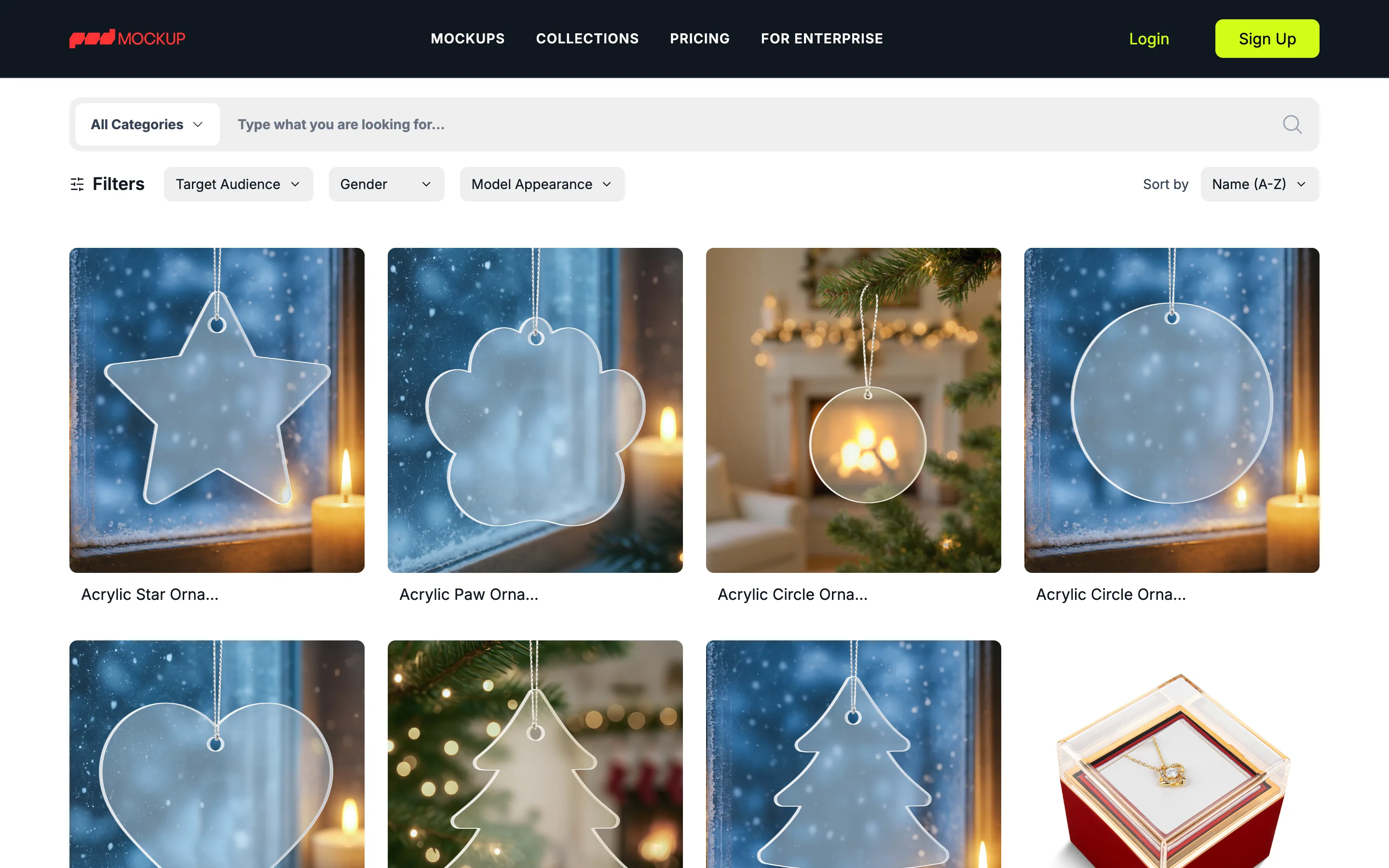
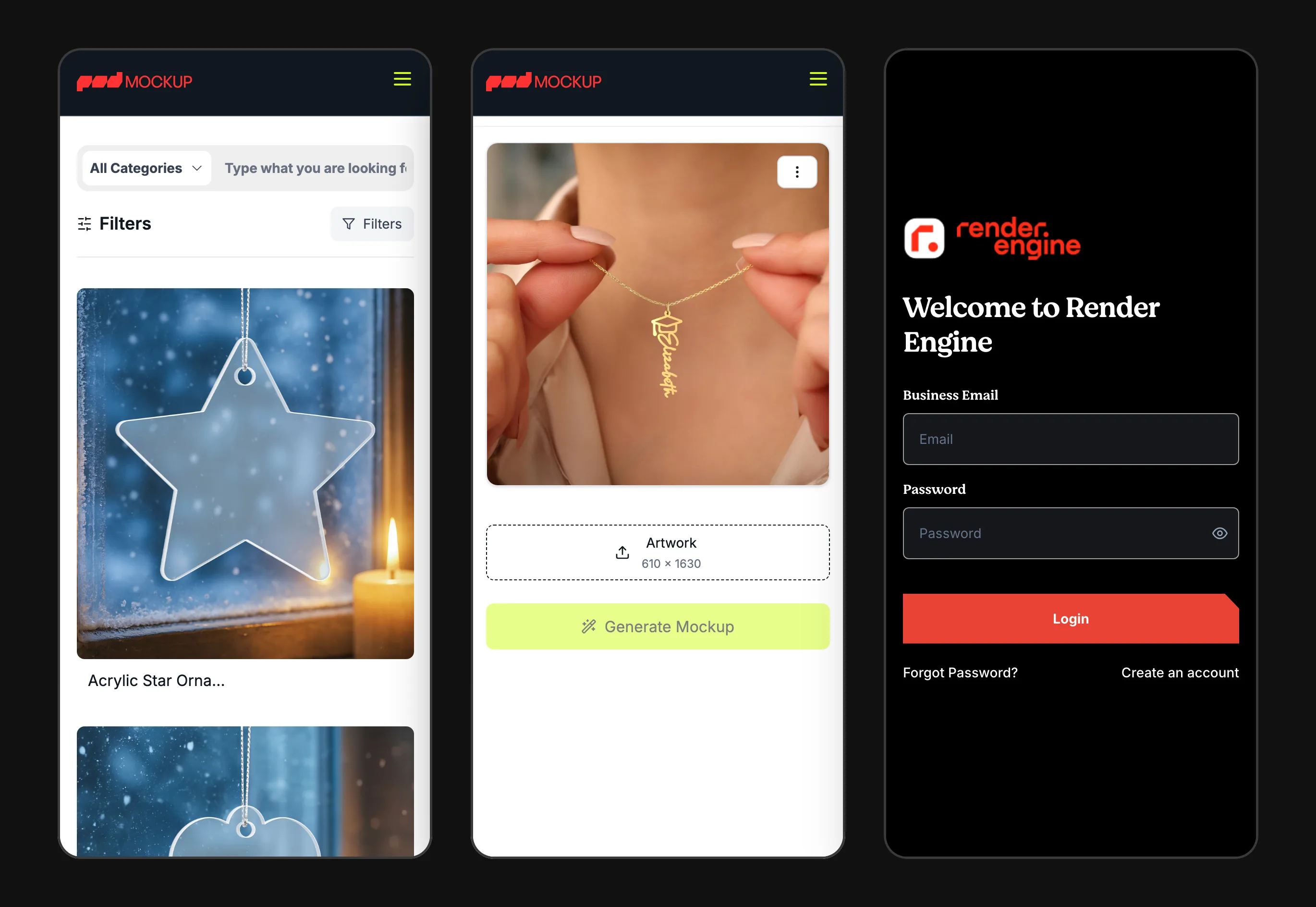
Render Engine storefront mockup page: artwork upload and Generate Mockup on the left, a rendered name necklace in the centre, similar mockups on the right
Artwork in Seller uploads a design and hits Generate
Template Warp, crop, maps and blend modes set once by a designer
Output High-resolution PNG or JPG, served from a CDN
3
Nuxt apps in one product
editor · B2B dashboard · storefront
~5 mo
From first prototype to full build
Apr → Sep 2025
318
Vue components across the apps
65,375 lines of .vue
470+
API endpoints behind the UI
NestJS · 61 Prisma models

One product, three audiences

Print-on-demand sellers need product photos for every design, in every colour, on every product. Shooting them isn't practical, and most mockup tools produce flat, obviously fake images.

Render Engine separates the two jobs. An internal design team builds reusable mockup templates once, with real warping, lighting maps and blend modes. Then anyone can drop artwork into a template and get a realistic mockup back.

It serves businesses through a dashboard and a REST API, and individual sellers through a public storefront, from one shared API and render pipeline.

Product
Mockup-generation SaaS for print-on-demand sellers and businesses
Our role
Product engineering end to end: three frontends, API, render worker, CI/CD
Frontends
Admin editor and B2B app on Nuxt 3 (SPA), storefront on Nuxt 4 (SSR)
Rendering
fabric.js + three.js, headless Chromium on AWS Lambda, sharp
Backend
NestJS 11, Prisma 6, PostgreSQL 16, Swagger-documented REST API
Payments
Stripe subscriptions, prepaid credit packs, signed webhooks
Delivery
Docker images built in GitHub Actions, S3-compatible storage + CDN

From a sandbox prototype to a five-repo platform

We didn't start with screens. We proved the hardest part first, modelled the business around it, then built outward. This is the order we follow on client products too, and every date below comes from git.

Build timelineApr 2025 → 2026
APR 2025 Prototype sandbox
MAY 2025 API, data model, billing
JUN 2025 Template editor
JUL 2025 Server render worker
AUG 2025 Storefront on Nuxt 4
2026 Hardening
01

Prototype the risky part first

Apr – May 2025

The riskiest question was technical: can we warp a flat design onto a product photo convincingly, in the browser? We started there, in a throwaway Nuxt sandbox, six days before the first product repo.

We built four versions of the canvas editor and four of the SVG crop tool there, along with the first warp, extrude-to-3D and surface-map tools. The Stripe credit-bundle flow was tested in the same sandbox.

In the repos
  • Separate Nuxt sandbox repo, started 16 Apr 2025
  • Canvas editor, 4 iterations
  • SVG crop tool, 4 iterations
  • Warp, extrude and surface-map prototypes
02

Model the product and the money

Apr – May 2025

Render Engine serves three audiences with different needs: an internal design team, businesses that call an API, and individual sellers who buy one mockup at a time. We modelled all three in one schema, with separate login realms and role sets.

Billing came early, not at the end. Stripe work starts on day two of the API. A template is stored as fabric.js JSON, so the editor and the server read the same document.

In the repos
  • NestJS API started 1 May 2025
  • Admin, company and customer auth realms
  • Roles: designer, moderator, support; company admin, developer, viewer
  • Swagger-documented REST API
03

Build the template editor

Jun – Jul 2025

Designers needed a real tool, not a form. We built the admin editor as a Nuxt SPA around a fabric.js canvas, with design, colour, general and watermark layers, 20 blend modes, per-layer filters, and drag-to-reorder layers.

In July the prototype tools moved into the editor as Vue components: crop, corner warp, free-form warp, surface maps and SVG extrude. Each tool saves its state into the template.

In the repos
  • Admin app started 11 Jun 2025
  • 20 blend modes, 5 per-layer filters
  • WebGL filter backend with Canvas2D fallback
  • Template import and export as JSON or ZIP
04

Move rendering to the server

Jul – Aug 2025

Customers never open the editor, so every render must happen server-side at print resolution. We packaged a headless-Chromium render worker as a container image on AWS Lambda.

The worker loads each template, replays every warp and crop with a port of the editor's three.js code, composites the layers with fabric.js in Node, and encodes the result with sharp.

In the repos
  • Render worker deployed to Lambda from CI
  • One cached browser per warm container
  • Layer variants pre-sized per output resolution
  • mozjpeg and PNG output via sharp
05

Open it to businesses and sellers

Aug – Sep 2025

With the engine working, we shipped the customer-facing surfaces. Businesses got API keys, team roles, usage analytics, subscription plans and credit packs. Sellers got a server-rendered Nuxt 4 storefront with collections, watermarked previews, Google sign-in and Stripe card payments.

In the repos
  • Storefront started 12 Aug 2025
  • Postgres full-text search, 13 Aug 2025
  • Public REST endpoint with x-api-key auth
  • 18 scheduled jobs, incl. Stripe reconciliation
06

Harden and maintain

2026

After the feature build, the work turned to reliability. Transient Lambda errors now retry with backoff, render failures come back as clear HTTP errors instead of timeouts, and the API was still getting fixes in August 2026.

In the repos
  • Lambda retry with backoff, Jun 2026
  • Worker errors mapped to clean HTTP codes
  • Payment filter fix, Aug 2026

Eight problems, and the real code that solved them

Excerpts are copied from the Render Engine repositories with file paths and line numbers. Nothing here was written for the case study.

01

Design once in the browser, replay it on the server

VuePiniathree.js
Problem
A designer sets warp control points, crops, maps and blend modes by hand. Every later render, with any customer's artwork, has to reproduce that setup exactly at print resolution.
How we solved it
Each editor tool serialises its full state into the layer's config inside the template JSON, through a Pinia store. The render worker reads those configs back and replays them with a port of the same three.js tool code.

Where this applies to you Any product where users build something visually and a server must produce it later, such as configurators, report builders or design tools.

radmin/components/render-library/Canvas/WarpTool.vueL998–1018
const organizedData = () => {
  let distortionData = {
    enableWrapTool: true,
    numRows: numRows.value,
    numCols: numCols.value,
    scale: currentScale.value,
    currentRotation: currentRotation.value,
    currentXPosition: currentXPosition.value,
    currentYPosition: currentYPosition.value,
    cornerLocalX: cornerLocalX.value,
    cornerLocalY: cornerLocalY.value,
    controlPoints: controlPoints,
    rotationGroup: {
      position: rotationGroup.position,
      rotation: rotationGroup.rotation,
    },
  };
  canvasStore.setRenderSettings(distortionData);
  canvasStore.setIsLocalDistortionEnabled(true);
  return distortionData;
};
02

WebGL in headless Chromium, inside AWS Lambda

LambdaPuppeteerChromium
Problem
The warp tools are WebGL. Running them on a server means running a real browser, and launching one on every request is slow and expensive.
How we solved it
The worker caches one Chromium instance per warm Lambda container and guards the launch with a lock, so concurrent calls share it. Each layer renders in a fresh page that is always closed.

Where this applies to you Server-side screenshots, PDFs, chart exports or any WebGL/canvas output that has to run headless on serverless infrastructure.

rengine-canvas/index.jsL1632–1655
async function initBrowser() {
  if (browserInstance) return browserInstance;

  if (isInitializing) {
    while (isInitializing) {
      await new Promise((resolve) => setTimeout(resolve, 100));
    }
    return browserInstance;
  }

  try {
    isInitializing = true;
    browserInstance = await puppeteer.launch({
      args: chromium.args,
      executablePath: await chromium.executablePath(
        "https://github.com/Sparticuz/chromium/releases/download/v119.0.2/chromium-v119.0.2-pack.tar"
      ),
      headless: chromium.headless,
    });
    return browserInstance;
  } finally {
    isInitializing = false;
  }
}
03

Free-form warping on a control grid

three.jsGeometry
Problem
Fabric folds, mugs curve and bags sag. A four-corner warp can't fit artwork to those surfaces.
How we solved it
The free-form warp uses an N×M grid of draggable control points. Catmull-Rom splines pass through the points along both axes and deform a 50×50 mesh, with Bézier edge curves for the simpler corner mode.

Where this applies to you Interactive editors that need real geometry, not just CSS transforms: mapping, annotation, image editing, product customisers.

rengine-canvas/public/index.htmlL1476–1502
function calculateFFDPoint(u, v) {
  const curveX = [];

  // Adjust interpolation for special cases
  for (let i = 0; i < numRows; i++) {
    const points = [];
    for (let j = 0; j < numCols; j++) {
      points.push(controlPoints[i * numCols + j].position.clone());
    }

    let interpolatedPoint;
    if (numCols === 2) {
      // Linear interpolation for 2 columns
      const start = points[0];
      const end = points[1];
      interpolatedPoint = new THREE.Vector3(
        start.x + (end.x - start.x) * u,
        start.y + (end.y - start.y) * u,
        0
      );
    } else {
      // Curve interpolation for 3 or more columns
      const horizontalCurve = new THREE.CatmullRomCurve3(points);
      interpolatedPoint = horizontalCurve.getPoint(u);
    }
    curveX.push(interpolatedPoint);
  }
  // …
04

The same compositing in the browser and in Node

fabric.jsCanvas
Problem
Layer order, 20 blend modes, clip masks and per-layer filters chosen in the editor must look identical in the final file.
How we solved it
The API recolours colour layers to the requested hex. The worker then rebuilds the canvas with fabric.js in Node from the same JSON the editor saved and swaps each warped artwork into its design layer.

Where this applies to you Keeping a WYSIWYG editor and its server-side export in sync, a common pain point in design, document and template products.

rengine-canvas/index.jsL1582–1597
const canvas = new fabric.Canvas(null, {
  width: renderLayerImageDimensions.renderLayerImageWidth || 1000,
  height: renderLayerImageDimensions.renderLayerImageHeight || 1000,
  enableRetinaScaling: false, // Performance improvement
  renderOnAddRemove: false,
});

// Load objects into canvas
await new Promise((resolve) => {
  canvas.loadFromJSON(fabricCanvas, () => {
    canvas.renderAll();
    resolve();
  });
});
05

Crop parity for raster and vector artwork

cropperjsSVGsharp
Problem
Designers crop in the browser in screen pixels. SVG artwork has to stay vector, so the same crop must land in the SVG's own viewBox coordinates.
How we solved it
The editor stores cropperjs state and restores it on load. On the server, raster crops replay through sharp, and SVG crops go through a custom SVGO plugin that rewrites the viewBox.

Where this applies to you Upload-and-crop flows for avatars, product images or print files where the output must match what the user saw.

rengine-canvas/index.jsL1431–1441
// Calculate scale factors between screen coordinates and SVG viewBox coordinates
// The frontend sends coordinates based on how the SVG is displayed on screen
// We need to convert these to SVG viewBox coordinates
const scaleX = viewBoxWidth / originalWidth;
const scaleY = viewBoxHeight / originalHeight;

// Convert frontend crop coordinates to SVG viewBox coordinates
const svgCropX = viewBoxX + left * scaleX;
const svgCropY = viewBoxY + top * scaleY;
const svgCropWidth = width * scaleX;
const svgCropHeight = height * scaleY;
06

Respond fast, optimise in the background

NestJSS3CDN
Problem
A print-resolution render is large. Making the user wait for web-optimised copies and thumbnails as well would slow every request.
How we solved it
The API saves the full-resolution URL and responds right away. A 1920px web copy and a 500px thumbnail are generated in the background and written back to the record. Files are served from a CDN with a one-year cache header.

Where this applies to you Media-heavy apps where perceived speed matters more than doing everything in one request.

rapi/src/modules/api/shared/services/image-generation.service.tsL74–92
const originalUrl = image.image.url;

// Save the image first with original URL for immediate response
const savedImage = await this.prisma.file.create({
  data: {
    url: originalUrl, // Keep original high-res URL
    optimizedUrl: originalUrl, // Temporary - will be updated
    thumbnailUrl: originalUrl,  // Temporary - will be updated
    fileName: fileName,
    fileType: fileType,
    createdAt: new Date(),
    updatedAt: new Date(),
    ...(options.companyId && { companyId: options.companyId }),
    ...(options.customerId && { customerId: options.customerId }),
  },
});

// Process and upload optimized versions in the background (non-blocking)
this.processAndUploadOptimizedVersions(savedImage.id, originalUrl, fileName, options);
07

API keys businesses can trust

SecurityRate limits
Problem
Businesses call the render API from their own systems. Keys must be revocable and safe if the database leaks, usage must be capped, and every call must be logged for billing.
How we solved it
Keys have a public ID and a secret. Only a bcrypt hash and a SHA-256 checksum of the secret are stored. Each key has an hourly limit counted from its usage log, and an interceptor records every call's endpoint, status and latency.

Where this applies to you Any SaaS that exposes a public API: developer keys, usage dashboards and limits that hold up.

rapi/src/modules/company/api-key/services/api-key.service.tsL46–64
generateApiKey(): { keyId: string; secret: string; fullKey: string } {
  // Generate random bytes for key ID and secret
  const keyIdBytes = crypto.randomBytes(16)
  const secretBytes = crypto.randomBytes(32)

  // Create readable key ID and secret
  const keyId = this.KEY_PREFIX + keyIdBytes.toString('hex')
  const secret = this.SECRET_PREFIX + secretBytes.toString('hex')
  const fullKey = `${keyId}.${secret}`

  return { keyId, secret, fullKey }
}

/**
 * Generate checksum for integrity verification
 */
generateChecksum(keyId: string, secret: string): string {
  return crypto.createHash('sha256').update(`${keyId}:${secret}`).digest('hex')
}
08

Subscriptions and prepaid credits in one ledger

StripePrismaBilling
Problem
Businesses can have a monthly render quota, prepaid credit packs, or both. Every render has to be charged to the right source exactly once, even when a Stripe webhook and a checkout confirmation arrive together.
How we solved it
Subscription quota is used first, then credits. Credits are deducted oldest-pack-first inside a database transaction. A processed flag on each purchase stops the webhook and the confirm path from both adding credits.

Where this applies to you Usage-based or hybrid pricing, where billing bugs cost real money and support time.

rapi/src/modules/api/shared/services/usage-tracking.service.tsL380–411
// Get credit purchases in FIFO order (oldest first)
const creditPurchases = await tx.companyCreditPurchase.findMany({
  where: {
    companyId: data.companyId,
    creditsRemaining: { gt: 0 },
    status: CompanyCreditPurchaseStatus.COMPLETED,
  },
  orderBy: { purchasedAt: "asc" }, // FIFO: oldest first
});

// Deduct from each purchase until we've deducted enough
for (const purchase of creditPurchases) {
  if (remainingToDeduct <= 0) break;

  const deductFromThisPurchase = Math.min(
    remainingToDeduct,
    purchase.creditsRemaining
  );

  await tx.companyCreditPurchase.update({
    where: { id: purchase.id },
    data: {
      creditsUsed: { increment: deductFromThisPurchase },
      creditsRemaining: { decrement: deductFromThisPurchase },
      lastUsedAt: new Date(),
      // …
    },
  });

  remainingToDeduct -= deductFromThisPurchase;
}

Three Nuxt apps, one API, one render worker

Each frontend gets the rendering mode it needs. Everything talks to one NestJS API, which sends render jobs to a serverless worker and stores the output behind a CDN.

Render Engine architecture: three Nuxt frontends and a REST API client connect to a NestJS API, which uses PostgreSQL, Stripe and email, and invokes an AWS Lambda render worker that writes to object storage behind a CDN.CLIENTSAdmin editorNuxt 3 SPA · PrimeVue 4fabric.js · three.js · cropperjsB2B appNuxt 3 SPA · PrimeVue 4API keys · teams · billingStorefrontNuxt 4 SSR · Tailwind 4previews · checkout · SEOBusiness systemsREST · x-api-keyPOST /v1/…/images/generateAPINestJS 11 API42 modules · 470+ endpoints3 JWT realms · role guardsAPI keys · usage loggingStripe webhooks · 18 cron jobsSwagger at /apiDocker image · GitHub ActionsPostgreSQL 16Prisma 6 · 61 modelsfull-text search · tree pathsRENDER & SERVICESRender workerAWS Lambda · container imageheadless Chromium + three.jsfabric.js composite in Nodesharp encode · SVGO cropretry with backoffObject storage + CDNS3 API · 1-year cacheStripesubscriptions · credits · 3DSResend · Google OAuth7 email templates · sign-in
Core services we builtApps & managed servicesCustomer systems

What this project shows about our Vue work

Right rendering mode per app

The editor and the B2B dashboard run as SPAs. The public storefront is server-rendered on Nuxt 4 with useAsyncData, so collection and mockup pages arrive as HTML for search engines and link previews.

ssr: false ×2 · ssr: true ×1
Heavy libraries, client-only

fabric.js is imported dynamically and marked SSR-external, and the whole editor app is client-rendered, so canvas code never runs on the server.

radmin/nuxt.config.ts
Editor state in Pinia

One canvas store owns zoom, pan, grid, layer locking and the CORS-safe filter fallback, so every editor tool reads and writes the same state.

pinia/canvas/canvasStore.ts
Editor-grade interaction

Drag-to-reorder layers with vue-draggable-next, kept in sync with fabric z-order. A design-only mode locks every layer except the artwork.

RenderEditorSidebar.vue
WebGL with a fallback

Filters run on fabric's WebGL backend with 8192px textures and fall back to Canvas2D when WebGL isn't available.

RenderEditorCanvas.vue
PrimeVue 4 theming

The B2B app uses a custom Aura preset through definePreset. The admin app adds a class-based dark mode.

themes/themes.js
Tailwind 3 and 4

The two Nuxt 3 apps use Tailwind 3. The Nuxt 4 storefront uses Tailwind 4 with CSS-first @theme tokens through the Vite plugin.

remocks/app/assets/css/main.css
Schema-validated forms

The admin app has a custom zod resolver for PrimeVue Forms and 7 shared schemas. The B2B app uses yup with the same form layer.

utils/createZodResolver.ts
Token refresh under load

In the admin app, all failing requests share one in-flight refresh. The B2B app queues requests and replays them. The storefront resolves auth from cookies during SSR.

plugins/axios.ts · useApi.js
Stripe Elements + 3-D Secure

Card capture uses Stripe Elements and confirmCardPayment in both the storefront and the B2B checkout, so bank challenges are handled.

PaymentModal.vue · Checkout.vue
SEO and image delivery

The storefront uses @nuxtjs/seo, @nuxt/image with AVIF/WebP output and immutable cache headers, and nuxt-booster.

remocks/nuxt.config.ts
Analytics UI

Usage trends, API usage and revenue charts with PrimeVue Chart in the B2B app and vue-chartjs in the admin app.

components/analytics/*

Projects where this experience pays off

You're building an editor or a visual tool

Canvas, WebGL, drag and drop, layers and complex editor state. This is the hardest kind of frontend to get right in Vue, and it's what we built here.

fabric.js + three.js editor inside Nuxt

Your SaaS has several faces

An admin panel, a customer dashboard and a public site, each with different rendering, auth and SEO needs, all on one API.

3 Nuxt apps · 3 auth realms · 1 API

You charge by usage

Subscriptions plus credits, quotas, webhooks and reconciliation jobs. Billing logic that stays correct when events arrive out of order.

FIFO credits · idempotent Stripe webhooks

You sell an API to other businesses

Developer keys, rate limits, usage logs and a dashboard your customers can read without filing a ticket.

Hashed keys · per-key limits · usage analytics

Questions teams ask us

Did VueSquad build Render Engine end to end?

Yes. The same engineers built the three Nuxt apps (admin editor, B2B app, storefront), the NestJS API, the AWS Lambda render worker and the CI pipelines that deploy them. Everything on this page comes from that code and its git history.

Can you build canvas or WebGL features in Vue?

Yes. Render Engine's editor runs fabric.js and three.js inside Nuxt, with Pinia managing editor state and heavy libraries loaded client-only. The same patterns apply to diagram tools, image editors, configurators and data-visualisation UIs.

Do you only work on the frontend?

Vue and Nuxt are our focus, but we work across the stack when the product needs it. On Render Engine that meant a NestJS + Prisma + PostgreSQL API, Stripe billing, and a serverless render worker on AWS Lambda.

Nuxt 3 or Nuxt 4?

Both. Two Render Engine apps run on Nuxt 3 and the storefront runs on Nuxt 4 with the new app/ directory layout. We can start a new project on Nuxt 4 or work in an existing Nuxt 3 codebase.

Can you take over or extend an existing Vue codebase?

Yes. Ongoing product work, large or evolving codebases, and migrations are a core part of what VueSquad does.

How do we start?

Send us a short note on the contact page about what you're building and where you're stuck. We'll set up a call to go through your product and codebase.

Get started

Building something this complex in Vue?

Talk to the engineers who built Render Engine's editor, storefront, API and render pipeline. Tell us what you're building and where it's stuck.

Matched in 24 hours·48 hours free on every plan·No long-term contract