
Case Study·Client project·Design system

In production

We built a Vue 3 design system that unified the UI across a growing family of products.

A SaaS company's products had each grown their own buttons, tables and forms. We built a shared Vue 3 component library on design tokens: 100+ accessible components, per-product theming, Storybook docs and versioned releases teams could adopt without a feature freeze.

  • Vue 3
  • TypeScript
  • Vite library mode
  • Storybook
  • Design tokens
  • Vitest
  • Playwright
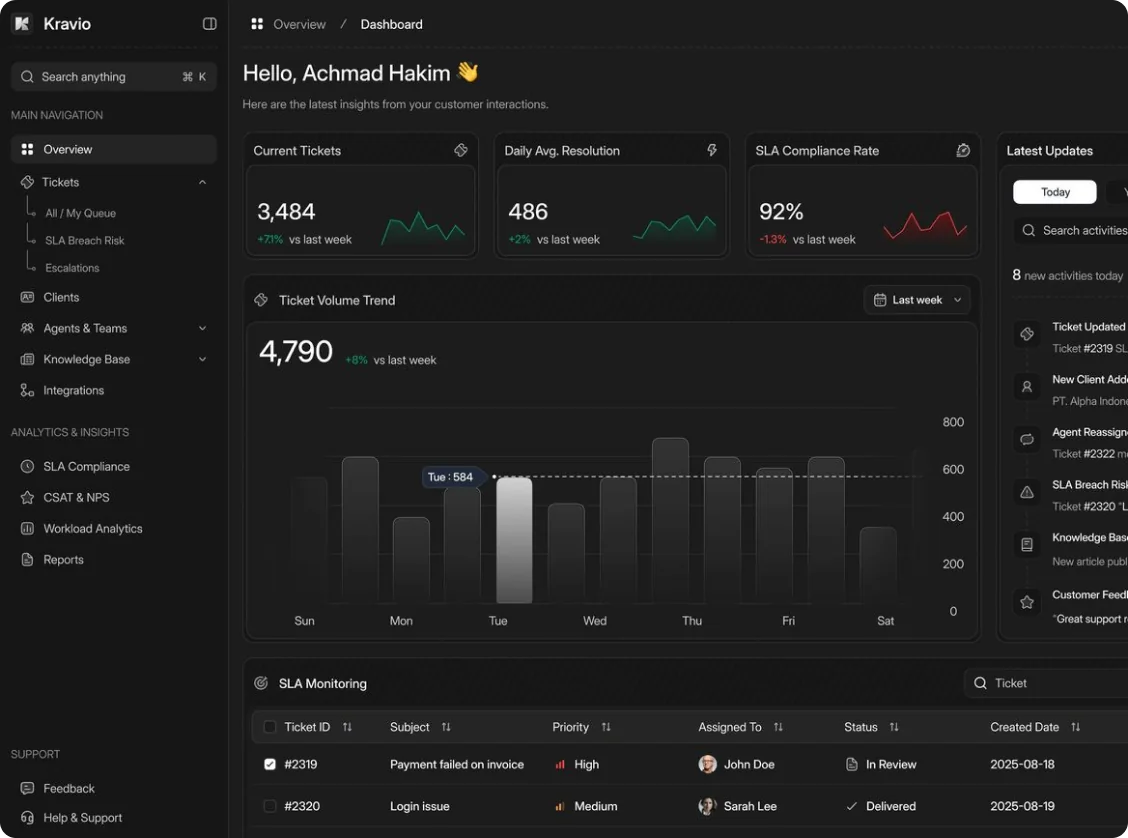
Helpdesk dashboard built from the shared Vue component library, with navigation, ticket stats and a volume chart
Shared components Navigation, cards, charts and tables from one library
Design tokens Colours, type and spacing from one source
100+
Reusable components shipped
forms · tables · navigation · overlays · charts
1
Shared token set
colour · type · spacing · motion
WCAG AA
Accessibility target
keyboard and screen-reader checked
SemVer
Versioned releases
a changelog and upgrade notes for each one

Products that grew apart

The client sells several products to the same customers. Each one was built by its own team, and over time each grew its own components. A customer moving between products saw different buttons, tables and error states, and every UI fix had to be made several times.

They wanted one design system: shared components that look the same, behave the same and meet accessibility requirements, without stopping feature work to adopt it.

We built the tokens, the component library, the documentation and the release process, and helped each product team adopt it. It's a client project, so this page describes our engineering without publishing the client's name or code.

Client
A SaaS company with several customer-facing products (name not published)
Our role
Design tokens, component library, documentation, release process and adoption support
Library
Vue 3 · TypeScript · Vite library mode
Styling
CSS custom properties generated from design tokens
Docs
Storybook with usage guidelines and live examples
Quality
Vitest · Playwright visual and accessibility checks
Status
Used across the client's product suite

Inventory, tokens, components, then adoption

We started from what already existed, put the visual decisions into tokens, built components in order of how much they were used, and moved products over screen by screen.

Project timeline7 months, then ongoing
MONTH 1 UI inventory
MONTH 2 Tokens & foundations
MONTH 3 Core components
MONTH 5 Product adoption
ONGOING Releases & governance
01

Inventory the UI that already exists

Month 1
On this project

Each product had grown its own buttons, tables, modals and form fields. We screenshotted and catalogued every variant across the apps, grouped the duplicates, and agreed with the designers which patterns the system would keep.

What you get
  • A clear picture of what exists before building anything
  • Agreement on which patterns to keep
  • A component roadmap ordered by real usage
02

Tokens and foundations first

Month 2
On this project

Colours, type, spacing, radii, shadows and motion became named design tokens, generated into CSS custom properties. Components only use tokens, so a product can be re-themed by changing tokens rather than overriding component styles.

What you get
  • One source of truth for visual decisions
  • Theming without CSS overrides
  • Designers and developers using the same names
03

Build the core components

Months 3 – 4
On this project

We built the most-used components first: buttons, inputs, selects, date pickers, tables, tabs, modals, toasts and navigation. Each one ships with typed props, slots for the cases props can't cover, keyboard support and a Storybook page.

  1. Form controls with validation states
  2. Overlays: modal, drawer, popover, toast
  3. Data table with sorting, selection and pagination
What you get
  • Components built in order of impact
  • Accessible by default, not as an afterthought
  • Docs written alongside the code
04

Adopt it product by product

Months 5 – 7
On this project

Nobody stopped shipping features for a big-bang rewrite. Each product moved screen by screen, starting with the pages it touched most often, and old components were deprecated with clear replacements.

What you get
  • No feature freeze while you adopt
  • A migration path for every old component
  • Visible progress on every release
05

Keep it healthy

Ongoing
On this project

Every release is versioned with a changelog and upgrade notes. Breaking changes are rare, announced a release ahead with deprecation warnings in development, and come with a codemod where one is practical.

What you get
  • Upgrades teams can plan for
  • Deprecation warnings before anything breaks
  • A contribution process for product teams

Six problems behind a design system teams adopt

Building components is the easy part. Getting several teams to use them, and keep using them, is the work. These are the problems we solved, described without exposing the client's code.

01

The same button, five different ways

ConsistencyInventory
Problem
Every product had its own version of the basics. Users moving between products saw different buttons, spacing and error messages, and every fix had to be made several times.
How we solved it
A full inventory turned the variants into a short list of agreed components and states. Each product replaced its local versions with the shared ones, starting with the most-used screens.

Where this applies to you Companies whose products grew separately and now need to look and behave like one family.

Start
Inventory of every existing variant
Decision
Agreed with design, documented
Rollout
Most-used screens first
Result
One component per pattern
02

Flexible without becoming a mess

API designSlots
Problem
A component that tries to cover every case through props ends up with dozens of booleans nobody understands. One that's too strict gets copied and forked.
How we solved it
Props cover the common, designed variants; named slots cover everything else. Composite components like tables expose small building blocks, so a product can assemble an unusual layout without forking the library.

Where this applies to you Teams building component libraries that several products will depend on.

Props
Designed variants, typed
Slots
For content props can't cover
Composites
Built from exported parts
Review
API reviewed before release
03

Accessible by default

AccessibilityWCAG
Problem
Each product had handled focus, keyboard navigation and labels differently, so accessibility issues kept reappearing in new screens.
How we solved it
Focus management, keyboard support, ARIA roles and visible focus styles live inside the components, so product teams get them for free. Automated accessibility checks run on every Storybook story in CI.

Where this applies to you Products with accessibility requirements from customers, procurement or regulation.

Target
WCAG 2.1 AA
Built in
Focus, keyboard, ARIA, labels
Checked
axe on every story in CI
Manual
Screen-reader passes on key components
04

One library, several brands

ThemingDesign tokens
Problem
The products share a company but not always a look. Some needed their own accent colours and density without forking the components.
How we solved it
Themes are sets of token values applied as CSS custom properties on a wrapper. A product picks a theme and density; the components never change, and dark mode is just another theme.

Where this applies to you White-label products or companies with several brands on one codebase.

Mechanism
CSS custom properties
Themes
Per product, plus dark mode
Density
Comfortable and compact
Overrides
Not needed for theming
05

Upgrades that don't break apps

ReleasesSemVer
Problem
A shared library is only useful if teams can upgrade it. Surprise breaking changes make teams pin old versions and drift apart again.
How we solved it
Releases follow semantic versioning with generated changelogs. Deprecated props and components log a warning in development for a full release before removal, and visual regression tests catch unintended changes before they ship.

Where this applies to you Any team publishing a package that other teams depend on.

Versioning
Semantic versioning
Changelog
Generated per release
Deprecations
Warned a release ahead
Safety net
Visual regression tests
06

Docs people actually use

StorybookDocumentation
Problem
Without good docs, developers guess at props and designers can't check what already exists, so new one-off components keep appearing.
How we solved it
Every component has a Storybook page with live examples, a props table generated from the TypeScript types, do's and don'ts, and copy-paste snippets. Designers review new components in Storybook before release.

Where this applies to you Libraries that need adoption across teams, not just a package on a registry.

Tool
Storybook
Props tables
Generated from types
Guidance
Usage do's and don'ts
Review
Design sign-off in Storybook

What this project shows about our Vue work

Typed component APIs

Props, emits and slots are fully typed, so editors autocomplete and misuse fails the build.

defineProps · defineEmits · defineSlots
Library build

Vite library mode with tree-shakeable exports, so apps only ship the components they use.

Vite · ES modules
Design tokens

Tokens compiled into CSS custom properties and typed constants from one source file.

tokens/*
Composables

Shared behaviour like focus trapping, floating positioning and keyboard lists lives in composables the components reuse.

composables/*
Forms

Inputs work with v-model and expose validation states, so they fit whichever validation library a product uses.

v-model · validation states
Data table

Sorting, selection, pagination and empty states, built from small exported parts.

DataTable
Unit tests

Behaviour and accessibility of each component tested in isolation.

Vitest · Vue Test Utils
Visual regression

Every story is screenshotted in a real browser and compared on each pull request.

Playwright

Projects where this experience pays off

Several products, one look

Bringing apps that grew separately into one consistent family.

UI inventory · shared components · product-by-product rollout

A component library

Designing and building a Vue 3 library other teams will depend on.

Typed APIs · slots · tree-shakeable builds

Accessibility requirements

Meeting WCAG targets without asking every team to become an expert.

Built-in focus and keyboard support · axe in CI

Theming and white-label

Several brands or customer themes on one codebase.

Design tokens · CSS custom properties · dark mode

Questions teams ask us

Is this a client project?

Yes. We built the design system for a SaaS company with several customer-facing products. The client's name and code aren't published, so this page describes the engineering and the outcome.

We already use a UI library. Should we build our own?

Not always. If an existing library fits your design closely, theming it is cheaper. A custom system pays off when you have several products, a distinct design, or accessibility and theming needs a general library doesn't meet.

Do we have to stop shipping features to adopt it?

No. On this project each product moved screen by screen alongside normal feature work, starting with its most-used pages.

Can you work from our Figma design system?

Yes. Tokens and component variants map directly from Figma, and designers review each component in Storybook before it's released.

Does it work with Nuxt?

Yes. The library is plain Vue 3 and renders on the server, so it works in Nuxt apps as well as Vite single-page apps.

How do we start?

Send us a short note on the contact page about your products and where the UI is drifting apart. We'll set up a call to look at your apps and designs.

Get started

Is your UI drifting apart across products?

Talk to the engineers who built this Vue 3 design system. Tell us about your products and where they've grown apart.

Matched in 24 hours·48 hours free on every plan·No long-term contract