
Case Study·Client project·Analytics dashboard

In production

We built a real-time analytics dashboard in Vue 3 that turned scattered reporting into one live view.

A customer-support SaaS needed its support leads to stop rebuilding reports by hand. We built a Vue 3 dashboard with live ticket metrics, fast charts on long date ranges, one shared set of filters and exports that match the screen.

  • Vue 3
  • TypeScript
  • Vite
  • Pinia
  • ECharts
  • WebSockets
  • Vitest
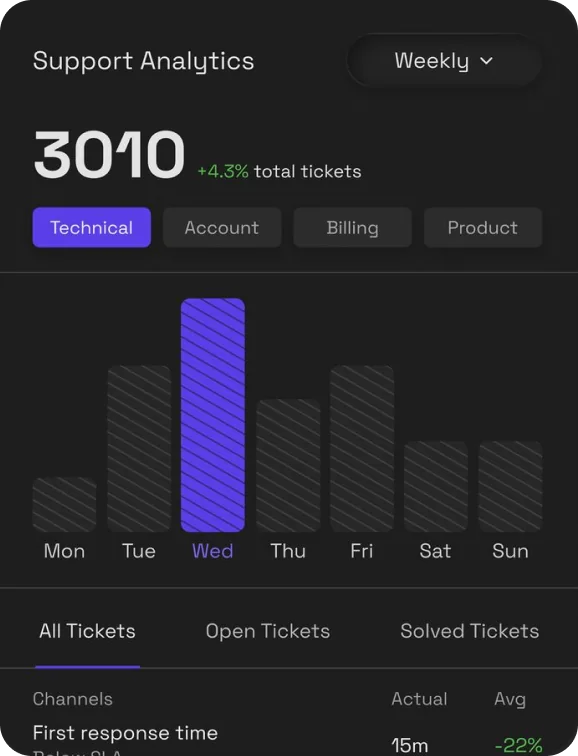
Support analytics dashboard with a weekly ticket chart, total ticket count and channel tabs
Live metrics Ticket counts update over WebSockets, no refresh
One filter bar Period and team apply to every chart at once
97%
Reporting workflow satisfaction
support leads surveyed after launch
1
Live reporting view
replacing exports and spreadsheets
Live
Ticket metrics
pushed over WebSockets, no refresh
Vue 3
Composition API
TypeScript from end to end

Support leads spending Mondays rebuilding the same report

The client runs a helpdesk product for B2B companies. Their own support leads, and their customers' leads, needed the same answers every week: how many tickets came in, how fast teams responded, where the backlog was growing and how customers rated the help they got.

Those answers lived in CSV exports, a separate BI tool and a few shared spreadsheets. Numbers didn't always agree, and building the weekly report took hours.

We built a dashboard inside the product that answers those questions live. It's a client project, so this page describes our engineering without publishing the client's name or code.

Client
A B2B customer-support SaaS (name not published)
Our role
Dashboard frontend, chart components, real-time data layer and exports
Frontend
Vue 3 · TypeScript · Vite · Pinia
Charts
ECharts, wrapped in typed Vue components
Data
REST for history · WebSockets for live updates
Quality
Vitest unit tests · Playwright smoke tests
Status
In production with the client's support teams

Questions first, then data, then charts

We started from the questions people asked every week, built a data layer every chart could share, and only then designed the views. It's the order we recommend for any reporting project.

Project timeline12 weeks
WEEK 1 Reporting audit
WEEK 3 Data layer
WEEK 5 Charts & filters
WEEK 9 Exports & sharing
WEEK 12 Roll-out & tuning
01

Audit how reporting actually works

Weeks 1 – 2
On this project

Support leads were stitching together CSV exports, a BI tool and spreadsheets every Monday. Before writing any code we sat with them, listed the questions they answered each week, and turned those into the metrics and views the dashboard had to provide.

What you get
  • A dashboard scoped around real questions, not every possible chart
  • Agreed metric definitions before any UI work
  • A short, prioritised build plan
02

Build a data layer the UI can trust

Weeks 3 – 6
On this project

History comes from the existing REST API; live changes arrive over a WebSocket. A small Pinia store merges both, so every widget reads the same numbers and none of them talks to the network on its own.

  1. Typed API client and metric store
  2. WebSocket channel for ticket events
  3. Reconnect and catch-up after a dropped connection
What you get
  • One source of truth for every widget
  • Live updates without page refreshes
  • Typed data from the API to the chart
03

Charts, filters and drill-downs

Weeks 5 – 9
On this project

We wrapped ECharts in a handful of Vue components with consistent props, colours and empty states, then built the views on top: ticket volume, first response time, resolution time, backlog by team and satisfaction scores, all driven by one shared filter bar.

What you get
  • Reusable chart components instead of one-off widgets
  • Filters that apply to the whole view at once
  • Shareable links to any filtered view
04

Exports, sharing and roll-out

Weeks 9 – 12
On this project

Exports are built from the same query as the screen, so a CSV always matches the chart it came from. We rolled the dashboard out team by team, watched how people used it, and tuned the default views from that.

What you get
  • Exports that match what people see
  • A gradual roll-out with feedback built in
  • Defaults tuned to real usage

Five problems behind a dashboard people trust

Drawing a chart is easy. Keeping it live, fast and consistent with every other number in the product is the work. These are the problems we solved, described without exposing the client's code.

01

Live numbers without a jittery screen

WebSocketsPiniaPerformance
Problem
Busy support teams generate a steady stream of ticket events. Re-rendering every chart on every event made the dashboard flicker and burned CPU on wall-mounted screens left open all day.
How we solved it
Events are applied to the store as they arrive, but charts redraw on a short, shared animation frame budget. Counters update immediately; heavier charts batch their changes, so the screen feels live without constantly moving.

Where this applies to you Any operational dashboard that stays open for hours and updates in real time.

Transport
One WebSocket per session
Updates
Batched per animation frame
Counters
Updated immediately
Reconnect
Catches up from the last event
02

Fast charts on long date ranges

EChartsData volume
Problem
A year of ticket data per team is a lot of points. Plotting raw rows made the browser stall and the charts unreadable.
How we solved it
The API returns data already bucketed by day, week or month depending on the range, and the chart components pick the bucket size automatically. Large series use ECharts' sampling, and off-screen charts don't render until they scroll into view.

Where this applies to you Dashboards that need to show both today and the last twelve months.

Buckets
Day, week or month by range
Large series
Sampled for display
Off-screen
Rendered when visible
Empty data
Explicit empty states
03

One filter state for the whole view

Vue RouterComposables
Problem
Each widget had its own date picker and team selector, so two charts on the same screen could quietly show different periods.
How we solved it
A single composable owns the filters and keeps them in the URL. Every widget reads from it, so changing the period or team updates the whole view at once, and any view can be bookmarked or shared as a link.

Where this applies to you Reporting tools where people share links to specific views.

Owner
One useFilters() composable
Persistence
Synced to the URL query
Sharing
Any view is a link
Defaults
Per-team saved views
04

Time zones and business hours

DatesCorrectness
Problem
Support teams work across time zones, and response-time targets only count business hours. A "day" in the dashboard had to mean the same thing as a day in the team's own schedule.
How we solved it
Every view has an explicit time zone, defaulting to the team's own. Dates are formatted with Intl, and the business-hours rules come from the same settings the helpdesk already uses, so the dashboard agrees with the SLA reports.

Where this applies to you Any product reporting on SLAs, shifts or teams in more than one time zone.

Time zone
Per view, team default
Formatting
Intl.DateTimeFormat
Business hours
Shared with the helpdesk
DST
Covered by unit tests
05

Exports that match the screen

CSVTrust
Problem
People stopped trusting reports when the exported numbers didn't match the chart they had just looked at.
How we solved it
Exports are generated from the exact query and filters behind the current view, including time zone and buckets. The file name records the filters, so a CSV in someone's inbox still explains itself.

Where this applies to you Teams who take numbers from the dashboard into finance or board reports.

Source
Same query as the view
Formats
CSV and PNG chart images
File names
Include filters and period
Access
Respects team permissions

What this project shows about our Vue work

Composition API throughout

Data loading, filters and live updates live in small composables that each widget reuses.

composables/*
Typed chart components

ECharts wrapped in Vue components with typed props, shared colours and consistent empty and loading states.

components/charts
State with Pinia

One metrics store merges REST history with live WebSocket events.

stores/metrics
URL-synced filters

Period, team and channel filters are kept in the route query, so views are shareable.

Vue Router
Lazy rendering

Charts below the fold render when they scroll into view, keeping first load fast.

IntersectionObserver
Accessible charts

Every chart has a text summary and a data table view for keyboard and screen-reader users.

ChartSummary
Tested logic

Bucketing, time-zone and business-hours rules are covered by unit tests, including daylight-saving changes.

Vitest
Smoke tests

Key views are opened in a real browser on every pull request.

Playwright

Projects where this experience pays off

A real-time dashboard

Operational screens that update live and stay open all day without slowing down.

WebSockets · batched redraws · reconnect and catch-up

Reporting people trust

One set of metric definitions, filters that apply everywhere and exports that match the screen.

Shared filters · URL views · consistent exports

Charts on lots of data

Long date ranges and many series without a sluggish browser.

Server-side buckets · sampling · lazy rendering

Replacing spreadsheets

Moving weekly CSV and spreadsheet reporting into a live view inside your product.

Reporting audit · agreed metrics · team roll-out

Questions teams ask us

Is this a client project?

Yes. We built the dashboard for a B2B customer-support SaaS. The client's name and code aren't published, so this page describes the engineering and the outcome.

Can you add real-time updates to an existing Vue dashboard?

Yes. On this project live ticket events arrive over a WebSocket and are merged into a Pinia store with the API's history, so existing charts update without each one managing its own connection.

Which chart library do you use?

Whatever fits the product. Here it was ECharts, wrapped in typed Vue components. We've also worked with Chart.js and D3, and we can keep the library you already use.

Do you only do frontend?

Vue and Nuxt are our core. On this project the client's team owned the API, and we agreed the endpoints and bucketing rules with them. When the dashboard needs backend changes, we can make them too.

Our dashboard is slow. Can you fix it rather than rebuild it?

Usually, yes. Batching updates, rendering off-screen charts lazily and moving bucketing to the server fixed most of the slowness here without a rewrite.

How do we start?

Send us a short note on the contact page about your dashboard and what's not working. We'll set up a call to go through your product and codebase.

Get started

Need a dashboard your team actually trusts?

Talk to the engineers who built this live analytics dashboard in Vue 3. Tell us what you're reporting on and where it's stuck.

Matched in 24 hours·48 hours free on every plan·No long-term contract