
Pinia vs Vuex: Should You Migrate Your Store?

Quick answer: Use Pinia for new Vue 3 and Nuxt state. For an existing Vuex app, keep stable Vuex modules unless they block upgrades, testing, TypeScript cleanup, or maintenance.
Your Vuex store still works. The tests pass. Customers don’t care what state library you use.
Then a Vue 3 or Nuxt migration touches routes, plugins, SSR, and shared state. The risky move is treating Pinia as a package swap. Mutations disappear. Namespaced modules change shape. Components that read the store need review.
The short answer: Pinia for new stores, staged migration for old ones
You need a decision the roadmap can live with, not a library debate.
 The Vuex repository says “Pinia is now the new default.” It also says Vuex 3 and 4 will still be maintained, but are unlikely to receive new functionality, according to the official Vuex repository.
The official Pinia migration guide covers Vuex ≤4. It was updated on October 20, 2026. It also says Vuex and Pinia can run together during migration, which is the key fact for product teams that can’t pause feature work.
Use this decision rule
| Option | Best when | Main benefit | Main risk | Recommended next step |
|---|---|---|---|---|
| Stay on Vuex | The app is stable, tested, and not blocked by upgrade work | Lowest disruption | Older patterns stay in the codebase | Keep the store and add tests around risky modules |
| Use Pinia for new stores only | New Vue or Nuxt features need shared state, but old modules are stable | Low-risk adoption | Two state patterns for a while | Set rules for which library owns each feature |
| Migrate module by module | Vuex blocks modernization, TypeScript cleanup, or maintenance | Smaller pull requests and safer rollback | Temporary dual-store complexity | Start with one low-risk module and its consumers |
| Migrate the whole store at once | The store is small, isolated, and well tested | One clean switch | Hard rollback if hidden dependencies exist | Freeze the API, migrate, test, and remove Vuex quickly |
If Pinia migration is part of a wider upgrade, plan it with the rest of the system. State often touches auth, routing, plugins, data fetching, and SSR. We usually treat it as one workstream inside a broader Vue 2 to Vue 3 migration plan, not as a package task.
What we would do for a product team
For a new Vue 3 or Nuxt product, we’d use Pinia.
For a mature Vuex product, we’d first ask one question: is Vuex causing real pain? If yes, migrate the modules that block progress. If not, leave stable modules alone and use Pinia for new state.
That keeps the team shipping while the architecture moves forward.
From our reviews, the most common mistake is treating the move as a one-to-one syntax conversion. Teams recreate Vuex modules and mutation habits in Pinia instead of rethinking state ownership. The better move is to keep stores focused, remove old abstractions, and make each store own one clear slice of app behavior.
Pinia vs Vuex: what actually changes in the code
This is where teams underestimate the work. The store file changes, and so do its consumers.
Vuex modules become Pinia stores
In Vuex, one store often contains namespaced modules. In Pinia, each former module usually becomes its own store. The official guide says each store needs an id, and state should be a function when migrating Vuex modules to Pinia stores.
| Vuex pattern | Pinia pattern | Migration note |
|---|---|---|
| Module | Store | Convert each former module into a store |
| Namespace | Store ID | Use a clear ID, often camelCase |
state object | state: () => ({ ... }) | Avoid shared state between instances |
| Getter | Getter or direct state access | Remove getters that only return state |
| Action context | this inside action | No context, commit, or dispatch object |
| Mutation | Action or direct assignment | Mutations do not exist in Pinia |
rootState / rootGetters | Import another store | Make cross-store reads explicit |
useStore / map helpers | Import the specific store | Update components and other store files |
The important part is ownership. A namespaced Vuex module may have hidden reads from root state. In Pinia, those dependencies should become clear imports.
Mutations become actions or direct updates
Vuex mutation discipline can help large teams. Pinia doesn’t force the same pattern, but you can keep the discipline with a team rule: components may read state, but meaningful changes go through actions.
That gives you clear business methods without carrying over Vuex boilerplate.
A small Vuex to Pinia example
Here is a small auth module converted from Vuex to Pinia. The behavior stays the same: load the user, set the token, and expose whether the user is signed in.
type User = { id: string; email: string }
type Credentials = { email: string; password: string }
type Session = { token: string; user: User }
type AuthState = { token: string | null; user: User | null }

declare const api: { login(credentials: Credentials): Promise<Session> }

export const auth = {
  namespaced: true,
  state: (): AuthState => ({ token: null, user: null }),
  getters: {
    isLoggedIn: (state: AuthState) => Boolean(state.token && state.user),
  },
  mutations: {
    setSession(state: AuthState, session: Session) {
      state.token = session.token
      state.user = session.user
    },
    clearSession(state: AuthState) {
      state.token = null
      state.user = null
    },
  },
  actions: {
    async login({ commit }: { commit: Function }, credentials: Credentials) {
      commit('setSession', await api.login(credentials))
    },
  },
}
import { defineStore } from 'pinia'

export const useAuthStore = defineStore('auth', {
  state: (): AuthState => ({ token: null, user: null }),
  getters: {
    isLoggedIn: (state) => Boolean(state.token && state.user),
  },
  actions: {
    setSession(session: Session) {
      this.token = session.token
      this.user = session.user
    },
    clearSession() {
      this.token = null
      this.user = null
    },
    async login(credentials: Credentials) {
      this.setSession(await api.login(credentials))
    },
  },
})
Component usage changes too. Instead of reaching into a generic Vuex store, import the exact store the component owns: const auth = useAuthStore().
A Vuex to Pinia migration plan that avoids a rewrite
A safe migration is boring on purpose: map, convert, test, replace, delete.
Step 1: map the store before editing
Start with a simple inventory:
- Vuex modules
- Components using each module
- Other modules using each module
- Tests covering actions, getters, and mutations
rootStateandrootGettersdependencies- Persisted state, SSR reads, and browser-only access
- DevTools or logging code tied to Vuex
This map shows your blast radius. Without it, you’ll miss consumers and create two sources of truth.
GitLab’s published frontend guide uses a single-step migration only for a one-module store. That store must have no more than 1,000 cumulative lines across actions, getters, and mutations. Larger stores use a staged path in GitLab’s Pinia migration guidance. Treat that as one team’s threshold, not a Pinia rule.
Step 2: migrate one module
Pick one module with clear ownership. Don’t change business behavior yet.
A good first module has:
- Few root dependencies
- Clear tests
- A small number of component consumers
- No SSR or persistence surprises
Create the Pinia store beside the Vuex module. Port state, getters, and actions. Convert mutations into actions or direct assignment. Update tests against the Pinia store before touching every component.
GitLab also recommends separating API migration from store redesign. That keeps behavior stable before deeper refactoring.
Step 3: replace consumers and delete Vuex last
Update components after the new store works. Then update other stores or composables that read the old module.
Delete the Vuex module only after tests pass and manual QA covers the consuming feature. This order matters. If you delete first, every hidden dependency becomes a release blocker.
If your team wants help checking migration risk before the branch grows, use Vue consulting and code review support. Keep the review focused on store ownership, SSR risk, tests, and consumers.
When keeping Vuex is the better choice
Migration has a cost, even when Pinia is the better choice for new work.
Do not migrate only because Pinia is newer
Stay on Vuex when the app is stable, the store is well tested, and the work doesn’t support a larger Vue, Nuxt, or TypeScript goal.
There is no need to invent a forced Vuex end-of-life date. The official position is narrower: Vuex is maintained, while Pinia is the default path for new functionality.
That makes the decision practical. If Vuex is not blocking you, spend the time on customer-facing work or test coverage.
A keep-or-migrate checklist
Use this checklist before you open the migration branch:
- Is the store blocking a Vue or Nuxt upgrade?
- Are TypeScript types around actions and getters slowing the team?
- Do new features need shared state that fits Pinia better?
- Are there enough tests around the modules you want to move?
- How many components consume the module?
- Does the module read
rootStateorrootGetters? - Does SSR read browser-only state too early?
- Can the team support two store systems during the transition?
- Is there a clear owner for deleting the old Vuex module?
If most answers are no, keep Vuex for now.
Pinia vs composables, local state, provide/inject, and local storage
Not every shared value deserves a global store.
| State type | Use this | Why |
|---|---|---|
| State used inside one component or page area | Local component state | Keeps ownership close to the UI |
| Shared logic or a small shared reactive value | Composable | Good when there is a clear owner and no store tooling needed |
| Scoped dependency in a component tree | provide / inject | Useful for context without app-wide state |
| Persistence across reloads | Local storage | Stores data, but should not own app behavior |
| State crossing routes or features | Pinia store | Gives a stable owner, tests, and DevTools inspection |
When Pinia is the right tool
Use Pinia when state crosses routes, affects multiple features, or needs clear business actions. Auth, cart state, account settings, feature flags, and complex filters often fit.
This is also where Pinia state management helps leaders. The team can test the store, inspect it, and assign ownership.
When a composable is enough
The Pinia vs composable question is usually about scope. If the state belongs to one feature and doesn’t need a global owner, a composable is enough.
A composable can also hold shared logic while Pinia owns durable state. Don’t make one tool do every job.
Why local storage is not a store
Pinia vs localstorage is a category mistake. Local storage is persistence. It saves values between page loads.
It doesn’t define who can change state, when it changes, or how the app reacts. Use it under a store or composable, not instead of one.
Production risks to catch before the migration branch grows
The failure modes are predictable. Catch them early and the migration stays small.
| Symptom | Likely root cause | How to confirm | Fix |
|---|---|---|---|
| UI shows old user, cart, or filters after migration | Vuex and Pinia both own the same data | Inspect both stores in DevTools and trace writes | Pick one owner and bridge reads only during migration |
| Feature breaks after removing a module | Hidden rootState or rootGetters dependency | Search old module paths and root getter names | Import the needed Pinia store directly |
| Hydration mismatch in Nuxt | Store reads browser-only state too early | Reproduce with SSR enabled and compare server and client output | Move browser reads into client-only code or delayed actions |
| Build or DevTools breakage | Pinia version requirements were missed | Check package versions and peer dependencies | Align dependencies before migration |
Dual-store stale state
Symptom: a user logs out, but one header still shows their account.
Root cause: Vuex clears the user, but the new Pinia auth store still has a copy. Confirm it by watching both stores during the same action. The fix is to make one store the owner.
rootState and rootGetters surprises
Vuex made root reads easy. Pinia makes dependencies explicit.
If a billing module reads user permissions from root getters, the Pinia version should import the auth or account store. Search for old getter names before deleting the Vuex module.
Nuxt SSR and hydration checks
Hydration means the browser attaches to HTML rendered by the server. If the server renders one value and the client renders another right away, Nuxt can warn or patch the DOM.
We see hydration mismatches as one of the common blockers in Nuxt production migrations. The usual cause is browser-only state, like local storage or window size, being read too early.
About Pinia vs Vuex performance
Don’t sell the migration on a vague speed claim. No sourced benchmark here proves Pinia is always faster than Vuex.
Measure your app instead. Look at store writes, expensive getters, component re-renders, and SSR payload size.
Pinia has version checks of its own. Since v4, @vue/devtools-api must be installed as a required peer dependency, according to the Pinia getting-started docs.
Who should do the migration, and where VueSquad fits
The right team depends on risk, capacity, and how much product context the migration needs.
| Option | Best fit | Trade-off | What you must own |
|---|---|---|---|
| In-house team | You have senior Vue capacity and time | Roadmap work slows while they migrate | Store ownership, test coverage, release plan |
| Freelancer | A small, isolated module with clear scope | Knowledge transfer can be thin | Architecture review and merge quality |
| Embedded senior Vue engineer | Your team owns the product but lacks Vue/Nuxt capacity | Needs onboarding and product context | Priorities, code review, release decisions |
| Dedicated Vue squad | Larger modernization with state, Nuxt, components, and performance work | More coordination than one engineer | Product goals, access, stakeholder feedback |
Use your own team when they have capacity
Your team knows the product. If they have senior Vue experience and the roadmap can absorb the work, keep it in-house.
This is especially true when the store encodes years of business rules. Outside help still needs your product context.
Bring in help when migration blocks the roadmap
Bring in help when the migration holds back Vue, Nuxt, or TypeScript work and your team can’t spare senior capacity.
At VueSquad, engineers work inside your tools: GitHub, GitLab, Linear, Jira, and Slack. Clients meet and approve the engineer before onboarding. If you need senior Vue capacity rather than a handoff project, you can hire senior Vue engineers who join your team.
We also split migration discovery into two paths: compatibility migration or fuller modernization. For a stable app with healthy architecture, we prefer in-place migration. For heavy technical debt or outdated libraries, a fresh Vue or Nuxt codebase can be safer.
VueSquad engagement options
| Engagement | Price | Hours | Best for |
|---|---|---|---|
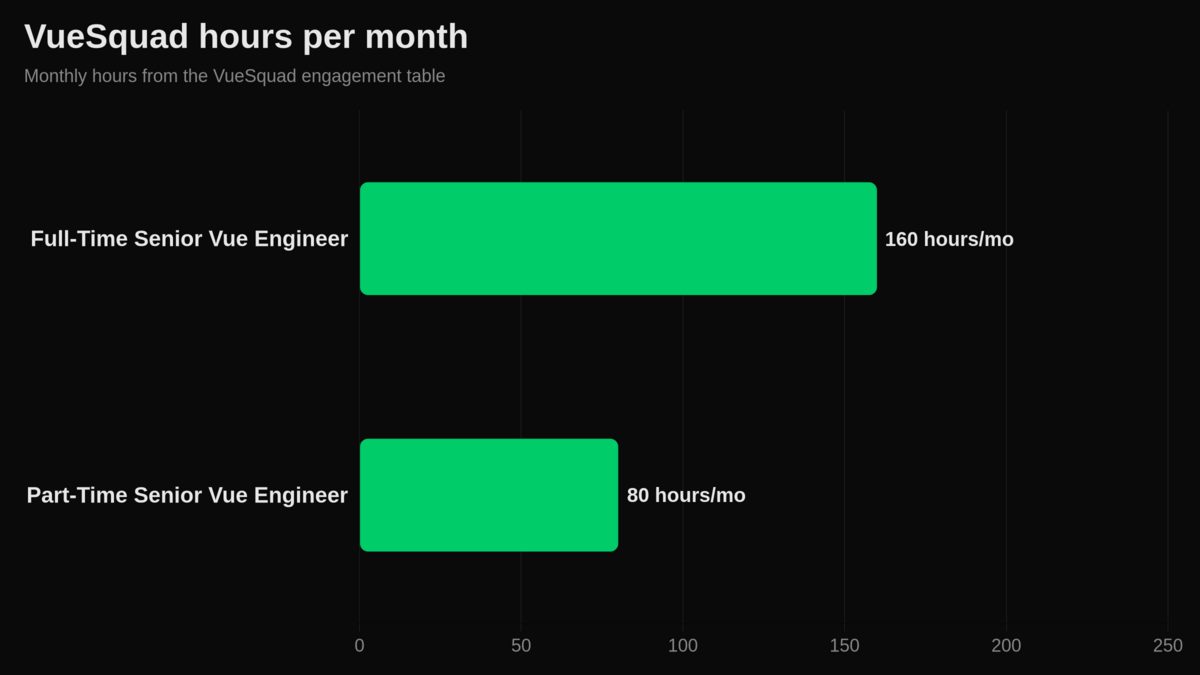
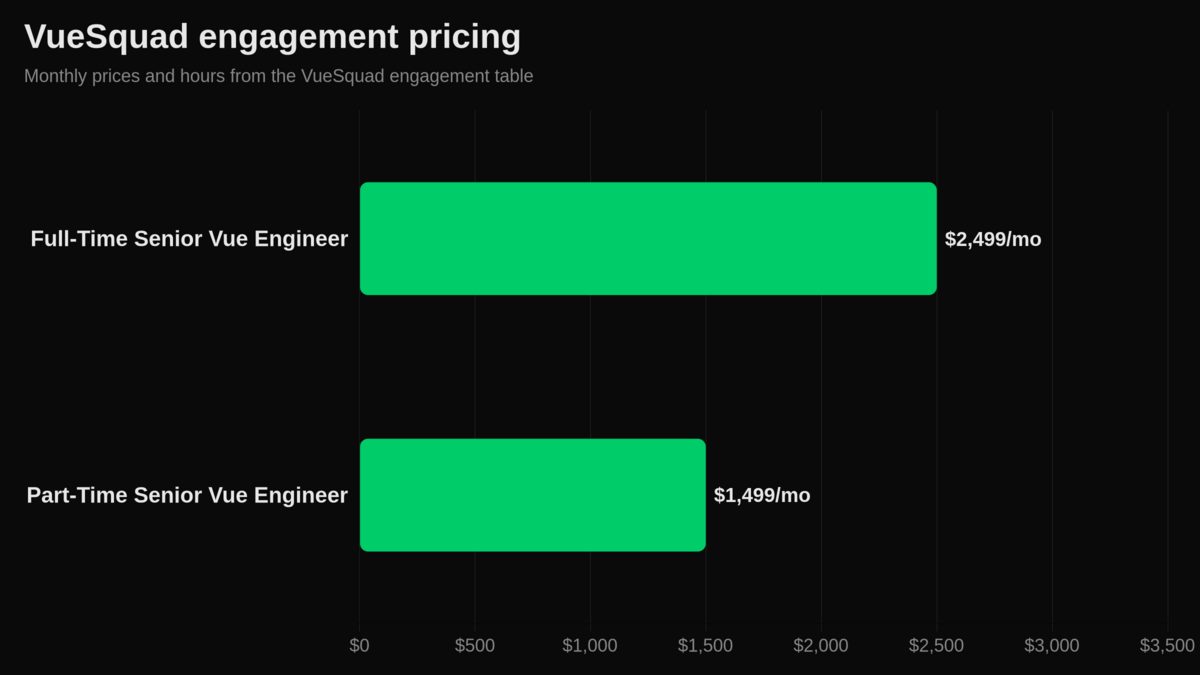
| Full-Time Senior Vue Engineer | $2,499 per month | 160 hours per month | Ongoing product development, SaaS platforms, large or evolving codebases, migrations, and long-term maintenance |
| Part-Time Senior Vue Engineer | $1,499 per month | 80 hours per month | Feature support, refactoring, performance optimization, UI modernization, and migration help |
| Dedicated Vue Squad | Custom pricing | Scoped per engagement | Complex products needing multiple senior Vue engineers and engineering-lead oversight |
Every plan has monthly billing, a flat rate, no onboarding fees, no minimum commitment, and the option to pause or cancel anytime. Teams can start within 48 hours in most cases, with overlapping hours for US and EU time zones. See VueSquad pricing and engagement models if you want to compare options.
We can also use modernization help without turning it into a Vuex story. In a US music-lesson marketplace’s Nuxt 2 → 3 migration, Pinia was added during the move to Nuxt 3 and Vue 3. It was not a Vuex-to-Pinia migration.
Your next step
If you’re building new Vue or Nuxt state, choose Pinia.
If you have a working Vuex store, map the modules and migrate only the parts that block the roadmap. When Pinia is one part of a larger upgrade, plan it alongside routing, plugins, SSR, tests, and dependencies through a Vue 2 to Vue 3 migration service.
Frequently asked questions
Does Pinia replace Vuex?
Yes, for new Vue state work, Pinia is the official default direction. Existing Vuex apps do not need an automatic rewrite. Use the decision table above: migrate when Vuex blocks upgrade work or long-term maintenance.
Can I use Pinia and Vuex together?
Yes. The official migration path supports running both during a staged move. The main rule is ownership: don’t let both stores write the same business state.
When should I use Pinia?
Use Pinia when state crosses routes or features and needs a clear owner. If the state belongs to one component, use local state. If it is shared logic with a small reactive value, a composable may be enough.
Should I migrate from Vuex to Pinia?
Migrate if Vuex is slowing Vue, Nuxt, TypeScript, testing, or feature work. Don’t migrate only because Pinia is newer. A stable Vuex store with good tests can stay where it is until there is a business reason to move.
What happened to Vuex mutations in Pinia?
Pinia does not have Vuex-style mutations. State changes happen through actions or direct assignment. If your team likes mutation discipline, keep a rule that meaningful state changes go through actions.
Is Pinia faster than Vuex?
Don’t assume that. Measure your app. The useful gains often come from cleaner store boundaries, fewer redundant getters, and better component ownership, not from a universal runtime speed claim.