
Outsource Frontend Development or Hire Vue In-House?

Quick answer: Outsource frontend development when you need senior Vue or Nuxt help now. Published 2026 bands run from about $25 to $300 per hour, depending on region, seniority, and scope.
Your roadmap needs two more senior Vue developers. Hiring is slow.
At the same time, your Nuxt app needs upgrade work. A dashboard is slow. Release bugs keep landing behind customer features.
The wrong choice is not only expensive. It can lock you into a vendor, or leave your team owning code they did not shape.
The short answer: outsource capacity, keep ownership
The safest model is usually hybrid: keep product ownership inside your company, then add outside Vue/Nuxt specialists where they lower risk.
Use this decision rule
Keep long-term product judgment in-house. Outsource frontend work when you need temporary capacity, specialist Vue/Nuxt help, migration support, or production rescue.
Your internal tech lead should still own the roadmap, release risk, architecture direction, and product trade-offs. The outside team helps ship focused work without waiting months to hire.
| Situation | Better model | Reason | Main risk to control |
|---|---|---|---|
| You need steady feature work every month | In-house Vue developers | Product context grows over time | Hiring speed and retention |
| You need senior capacity for a short push | Staff augmentation or a dedicated Vue development team | Faster help without permanent headcount | Backlog clarity and code review |
| Your Nuxt migration is stuck on dependencies | Specialist Vue/Nuxt team | Migration risk is framework-specific | Handover and test coverage |
| You need one isolated UI fix | Freelancer | Low overhead for a small task | Bus factor and availability |
| You need product, backend, design, and frontend delivery | General agency | Wider delivery coverage | Named Vue/Nuxt experience |
Outsourcing fails when you expect one developer to replace product direction, architecture decisions, QA ownership, and release management.
A developer can ship code. They cannot guess your pricing rules, support edge cases, or board-level delivery trade-offs.
When a hybrid team is the cleanest choice
A hybrid team works when your internal lead has context, but not enough hands.
Picture this setup: your tech lead owns the technical direction. Your product manager owns priorities. Two external senior Vue engineers work in your GitHub, Jira, Slack, or Linear.
That model protects ownership. It also avoids the slow path of hiring in-house before the migration, redesign, or customer deadline starts.
Vue team cost comparison: in-house vs outsourced
Cost gets messy because salary, hourly rates, agency invoices, and monthly capacity are not the same thing.
Do not compare salary to an agency invoice
A salary is not your full employee cost. An hourly agency rate is not always just coding time.
One 2026 estimate puts a US senior frontend developer's first-year employment cost at $242,000–$307,000, including salary, employer costs, and recruiting. A separate 2026 calculator gives a lower fully loaded example, so treat these as commercial estimates, not a universal benchmark.
Published Vue-specific bands vary by model. US Vue freelance work is estimated at $100–$175/hour, while standard US Vue agency work is estimated at $130–$200/hour. US boutique agency estimates reach the top of the headline range above.
Eastern European Vue agency developer estimates sit at $50–$90/hour. Offshore development-firm estimates start at the low end of the headline range and run to $80/hour. One outsourced developer-equivalent estimate gives €3,200–€5,000 per month.
| Model | Published cost band | What the price usually covers | Best fit | Main caution |
|---|---|---|---|---|
| In-house senior frontend developer | US first-year employment estimate above | Employee time, internal knowledge, long-term ownership | Core product work | Slow hiring and full management load |
| Freelancer | US Vue freelance band above | Mostly individual delivery | Small fixes, audits, narrow tasks | Single-person dependency |
| Staff augmentation | Regional developer rate plus provider margin | Added developer capacity | Teams with strong internal leads | You own direction, review, and QA |
| Specialist Vue/Nuxt agency | US agency and boutique bands above | Often architecture, review, QA, and delivery support | Migrations, SSR, performance, rescue work | Higher invoice and vendor dependency |
| Offshore or nearshore firm | Offshore and regional bands above | Varies by provider | Well-scoped work with oversight | Rework can erase savings |
Worked example: two senior Vue developers for one month
Use this formula:
Monthly cost = engineers × monthly hours × rate
Example: say you need two senior Vue developers for one month. Each works 160 hours.
Using the US agency band above, the monthly invoice would be $41,600–$64,000.
Using the Eastern European agency band above, the monthly invoice would be $16,000–$28,800.
Those numbers do not mean the cheaper team is better. They mean you need to ask what is included.
Does the invoice include code review? QA? Architecture? Release help? Documentation? Or are you buying coding hours your team must manage?
What the cheapest rate can hide
Low rates can work when the task is clear and your team is strong.
They break down when the outside team needs to discover the domain, clean up unclear state ownership, fix release bugs, and write missing tests.
The real cost is not the hourly rate. It is the cost of getting production-safe code into your app without slowing your team down.
What each frontend team model actually gives you
You are not only buying Vue code. You are buying ownership, judgment, and the amount of management work left on your plate.
Freelancer vs staff augmentation vs dedicated team
A freelancer is best for a contained problem. Staff augmentation is best when you already have a strong lead. A specialist Vue/Nuxt team is best when the work needs framework judgment, shared standards, and delivery support.
| Responsibility | In-house team | Freelancer | Staff augmentation | Specialist Vue/Nuxt team |
|---|---|---|---|---|
| Backlog clarity | Owns it | Needs it from you | Needs it from you | Shares it with your lead |
| Architecture | Owns it | Advises in scope | Follows your lead | Can own or co-own |
| Code review | Internal | Limited unless agreed | Your team reviews | Included if scoped |
| QA | Internal | Usually limited | Your team owns | Can be shared |
| Release support | Internal | Usually narrow | Your team owns | Can support releases |
| Documentation | Internal | Must be requested | Must be requested | Should be part of handover |
| Long-term maintenance | Strongest fit | Weak fit | Your team owns | Good if engagement continues |
If you want to hire senior Vue engineers, decide first whether you need people, a delivery team, or a specialist layer.
Those are different purchases.
Where software outsourcing companies fit
General software outsourcing companies can work when Vue is only one part of a larger product build.
They may cover backend, mobile, design, QA, and project management. That helps if you do not have a product team yet.
But Vue/Nuxt-specific work needs named framework experience. Ask who will touch the repo. Ask what Nuxt migrations they have shipped. Ask how they debug SSR and hydration.
A company logo does not tell you whether the assigned engineer can fix unclear Pinia ownership.
Who owns the code after delivery
Your company should own the code, repo, deployment path, and production knowledge.
That means the outside team works in your tools. Pull requests are reviewable. Decisions are written down. Handover is not a final meeting on the last day.
If the vendor is the only group that understands your component system, you outsourced more than capacity. You outsourced memory.
When an outsourced Vue team is the safer choice
Outside help is safer when the problem is specific, urgent, and easy to get wrong without Vue/Nuxt production experience.
Nuxt migrations and production blockers
Outsource when the work needs Vue 3, Nuxt, TypeScript, SSR, hydration, performance, migration, or component architecture experience.
Nuxt moves quickly. The Nuxt updates page lists Nuxt 4.6.0 on October 5, 2026, with changes around nuxt/server, sessions, typed $fetch, Vue Vapor support, development errors, and data fetching.
Nuxt 4.5.0 came before it with Vite 8, Rspack 2, experimental SSR streaming, stable error codes, useLayout, and named views.
Nuxt 3 reached end of life on July 31, 2026. Teams still on older Nuxt versions need an upgrade plan, not “we'll do it later.”
Community threads show the same pattern. Teams discussing a Nuxt 2 to Nuxt 3 move describe dependency compatibility, plugins, middleware, and config changes as the real work. It is not just a package update in package.json in the Nuxt discussion.
We saw that on a US music-lesson marketplace's content site. We migrated it from Nuxt 2.15 and Vue 2 to Nuxt 3.10 and Vue 3.4.
One VueSquad engineer did the migration while the client's developer reviewed and merged work. The client kept editing CMS content during the migration.
The work took about one week. Before migration, the app had 42 pages, 26 components, 6 layouts, 10 plugins, 263 content files, and about 6,700 lines of Vue/JS/TS.
After migration, it had 38 pages, 38 components, 6 layouts, 1 plugin, 272 content files, and about 6,900 lines.
The main blocker was Nuxt Content v1 to v2 markdown rendering.
If your app has similar risk, start with Vue 2 to Vue 3 migration support or Nuxt migration support.
Failure mode: hydration mismatch after a Nuxt change
Hydration is when the browser takes over HTML rendered by the server. A mismatch means the server HTML and browser HTML do not match.
We see hydration mismatches as one of the most common blockers in Nuxt production migrations.
Symptom: the page looks fine locally, but production logs show hydration warnings. A button may not work until the page rerenders.
Root cause: server and client render different output. Common triggers include random values in templates, browser-only APIs during render, dates formatted differently, or data fetched in two different ways.
How to confirm: compare the server-rendered HTML with the browser DOM. Then remove dynamic values until the warning disappears.
Fix: make the first render deterministic. Move browser-only work behind client-only logic, and make server and client data come from the same source.
<script setup lang='ts'>
const timezone = ref<string | null>(null)

onMounted(() => {
  timezone.value = Intl.DateTimeFormat().resolvedOptions().timeZone
})
</script>

<template>
  <ClientOnly>
    <p v-if='timezone'>{{ timezone }}</p>
  </ClientOnly>
</template>
This Nuxt example keeps the server render stable. Browser-only UI runs after the browser owns the page.
In the same anonymized Nuxt 2 to Nuxt 3 migration, prerendering and hydration became a production blocker. The symptom was clear: some pages rendered during local checks, but the static build still hit hydration errors and prerender failures.
The root cause was old Nuxt 2-era rendering and fetching patterns meeting Nuxt 3. Slug pages and intro content needed useAsyncData, and one teacher ZIP route could not be safely prerendered.
We confirmed it through failing prerender output and targeted commits around the affected routes. The fix was to move the page data and intro fetches to Nuxt 3 patterns, stabilize markdown rendering, and exclude that one route from prerendering.
When performance work needs Vue-specific judgment
Performance work means more than making the bundle smaller.
In Vue and Nuxt apps, the fix may live in component boundaries or reactive state shape. It may also be in route-level data fetching, SSR output, image handling, or a third-party module.
If your slow page is a data-heavy dashboard, the answer may differ from a slow content site. A Vue/Nuxt specialist should inspect reactivity, component rerenders, and Nuxt rendering mode.
When your in-house Vue team should own the work
Outsourcing is the wrong answer when product judgment matters more than extra hands.
Do not outsource product judgment
Keep the work in-house when the Vue product is central to the business and the work will continue every month.
Your own team wins when it already understands Vue 2 and Vue 3. It also knows domain rules, release risk, customer workflows, and hidden edge cases.
That matters in pricing logic, healthcare workflows, admin permissions, booking flows, data-heavy dashboards, and release-critical product areas.
Teams on r/vuejs raise this point during migration discussions too. In one thread, a commenter preferred handling a Vue 2 to Vue 3 migration internally. The reason was simple: the team already knew both versions and its own app well enough to do it themselves.
That is a valid choice.
If your team has the skill and time, do not pay outsiders to relearn your business.
Use outside help as a specialist layer
You can still use outside help without giving away ownership.
Bring in a senior Vue/Nuxt engineer for architecture review, migration planning, performance diagnosis, or temporary extra hands.
VueSquad's migration discovery asks one early question: do you want a Vue 3 compatibility migration, or a full modernization?
We prefer in-place migration when the app is stable, architecture is healthy, and most dependencies have Vue 3 paths. We prefer a fresh Vue 3 or Nuxt codebase when technical debt, outdated libraries, or poor structure mean the migration would touch most of the code anyway.
How to vet software outsourcing companies for Vue and Nuxt
A good sales call proves almost nothing. You need to evaluate the people who will work in your repo.
Questions that expose real Vue experience
Ask for named engineers, not only company logos.
Then ask Vue-specific questions:
- When do you use
ref,reactive,computed, andwatch? - How do you structure composables so they do not become hidden global state?
- Who owns Pinia state in a feature?
- How do you avoid direct prop mutation?
- How do you debug SSR and hydration issues in Nuxt?
- What does a good pull request look like in a Vue codebase?
- How do you plan dependency migration before touching components?
We have seen senior Vue candidates use ref(), reactive(), computed(), and watch() without being able to explain when or why to use each.
That gap matters. It shows up later as strange state bugs and hard-to-review components.
Red flags in a Vue or Nuxt codebase
We have seen outside Vue codebases with large components, direct prop mutation, unclear component communication, messy composables, and mixed Pinia ownership.
Use this scorecard before you sign.
| Evaluation area | Strong signal | Red flag | Question to ask |
|---|---|---|---|
| Named team | You meet the engineer before start | Only sales staff join calls | Who will commit code? |
| Composition API | Can explain trade-offs clearly | Knows syntax but not judgment | When is watch the wrong tool? |
| Components | Small, named, reviewable files | Giant single-file components | How do you split a complex page? |
| State | Clear Pinia ownership | Store used as a dumping ground | What belongs in local state? |
| Nuxt SSR | Can debug hydration | Treats all bugs as browser bugs | How do you confirm a mismatch? |
| Migration | Dependency plan first | Starts with bulk edits | Which packages block the upgrade? |
| Handover | Docs, PR notes, review path | Knowledge stays with vendor | What do we own on the last day? |
A simple vendor scorecard
Score each area from 1 to 5:
- Named Vue/Nuxt engineers
- Relevant migration or production examples
- Code review standards
- Testing expectations
- Release support
- Documentation and handover
- Time-zone overlap
- Fit with your team's tools
Do not pick the lowest score that fits the budget. Pick the team that reduces management work without taking product ownership away from you.
Where VueSquad fits if you choose a dedicated Vue team
VueSquad is one option if you want senior Vue/Nuxt capacity embedded inside your product team.
 We focus on Vue 3, Nuxt, TypeScript-first development, component-driven architecture, migrations, performance, stability, and maintainability. Engineers join your tools, including GitHub, GitLab, Linear, Jira, and Slack.
VueSquad is not a freelancer marketplace and not a general agency that also lists Vue. Clients meet and approve the engineer before onboarding.
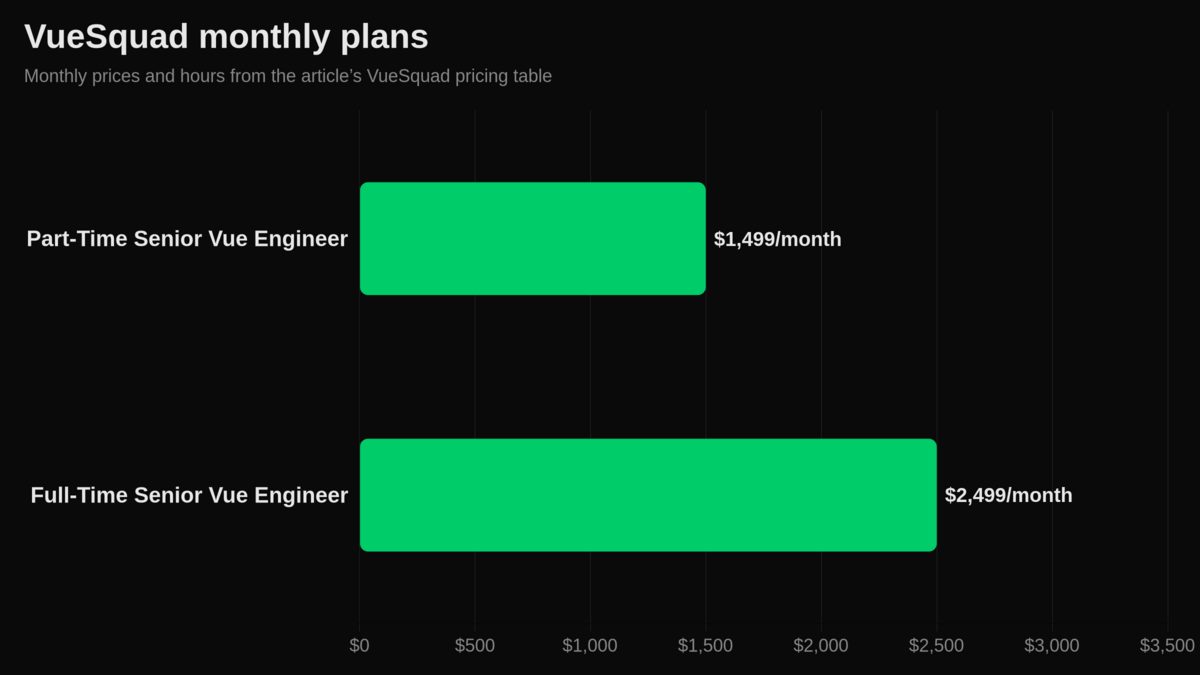
Every plan uses monthly billing, flat rates, no onboarding fees, and no minimum commitment. You can pause or cancel anytime. Start is within 48 hours in most cases, with overlapping US and EU hours.
| VueSquad model | Price | Hours | Best for |
|---|---|---|---|
| Part-Time Senior Vue Engineer | $1,499/month | 80 hours/month | Feature support, refactoring, performance optimization, UI modernization, migration help |
| Full-Time Senior Vue Engineer | $2,499/month | 160 hours/month | Ongoing product development, SaaS platforms, large codebases, migrations, maintenance |
| Dedicated Vue Squad | Custom pricing | Scoped to team | Multiple senior Vue engineers with engineering-lead oversight, shared standards, design system support, sprint planning, weekly reporting |
You can compare the models on VueSquad pricing and engagement models, or start from the embedded senior Vue and Nuxt team page.
About the author
Sudipto Mondal is a Senior Software Engineer and full-stack developer with 5+ years of experience in SaaS platforms, eCommerce systems, and custom software.
Your next step
If Vue is core to your product, keep ownership in-house.
If you need senior Vue/Nuxt capacity now, use outside help for risky or time-bound work: migrations, production blockers, performance, or roadmap overflow.
Write down what you want to keep, what you want help with, and who owns release risk. If the gap is senior Vue/Nuxt capacity, compare your options against a dedicated Vue development team.
Frequently asked questions
Is it cheaper to outsource?
It can be cheaper for short-term, specialist, or uneven workloads. It is not automatically cheaper if you pay for rework, unclear handover, or heavy vendor management. Use the cost section's formula and compare full internal cost with full outsourced cost.
How does outsourcing work?
You define the outcome, agree on the model, give access to tools, and set review rules. For Vue/Nuxt work, make sure the contract says who owns architecture, QA, release support, documentation, and long-term maintenance.
What is a frontend web developer?
In simple terms, frontend development means building the part of the web app users see and interact with. In a Vue or Nuxt product, that can include component architecture, state, routing, SSR behavior, performance, testing, and API integration.
Should I outsource a Vue 2 to Vue 3 migration?
Outsource it if your team lacks time, migration experience, or confidence with dependencies and release risk. Keep it in-house if your team already knows both versions and understands the codebase well. Outside help can still review the plan or handle a hard blocker.
Is a dedicated Vue team better than freelancers?
A dedicated Vue team is better when the work spans architecture, migration, performance, QA, and release support. A freelancer can be the right choice for a small, clear task. Pick the model based on ownership, not only price.