
Nuxt 5 release: what product teams should prepare for

Quick answer: Nuxt 5 is scheduled for Q4 2026, but it is not stable yet and the date is an estimate. If you run Nuxt 4, start compatibility checks now; if you run Nuxt 2 or 3, move through the current upgrade path before treating Nuxt 5 as the next step.
Your Nuxt app is shipping features. Then an upgrade branch hits an API route that used server auto-imports, a module with Nitro-specific code, and a deploy script nobody has touched in months.
The release date isn’t the real risk. The risk is finding those blockers only after Nuxt 5 is stable.
Technical review: Sudipto Mondal, Senior Software Engineer and full-stack developer with 5+ years of experience in SaaS platforms, eCommerce systems and custom software.
The Nuxt 5 release answer for product teams
You need a plan before you need a migration branch.
The official roadmap marks the release window above as estimated and lists end of life as TBA for Nuxt releases. Treat that window as a signal to prepare, not as a fixed launch day.
Nuxt’s upgrade docs also say Nuxt 5 is currently in development, so don’t treat it as stable production software yet. Use the time to remove known blockers in code you control.
| Current situation | Recommended move | Why | Watch out for |
|---|---|---|---|
| Nuxt 4 product | Start compatibility checks now | You can reduce risk while feature work continues | The compatibility flag does not cover Nitro 3 |
| Nuxt 3 product | Identify the Nuxt 4 path first | Your next step may be a normal upgrade | Server code can hide most of the work |
| Nuxt 2 product | Plan the current migration path first | Waiting can make the later jump larger | Don’t turn migration fear into a rewrite by default |
| Heavy debt in any version | Decide if the app is still safe to change | Migration may touch most of the product | A fresh codebase can be safer when structure is already failing |
Here is the rule we’d use. Prepare now if you’re already on Nuxt 4. If you’re on an older version, get to a supported current base first. If you need help shaping that path, our Nuxt migration service for product teams is built for Nuxt 2/3 to Nuxt 4 work now, with Nuxt 5 readiness added where it helps.
There is no exact Nuxt 5 launch day from official sources. Don’t build a fixed delivery promise around a date that does not exist yet.
What changes in Nuxt 5 that you can act on now
The safest work starts in the Nuxt code you already own.
Nitro 3 is the main server-side change
Nuxt 3 and Nuxt 4 target Nitro 2, while Nuxt 5 defaults to Nitro 3 in Nuxt’s server compatibility guidance. Nitro is the server engine behind API routes, middleware, runtime config access, and module server hooks.
If your app is mostly static pages, the risk may be smaller. If your product has sessions, API routes, custom modules, webhooks, or hybrid rendering, start there.
Server code needs the closest review
Nuxt describes Nitro 3 as a major rewrite built on srvx and h3 v2, with Web-standard Request and Response APIs in the Nuxt 5 upgrade guide. That is not a reason to panic. It is a reason to audit early.
Start with these areas:
server/apiandserver/routes- server middleware
- auth and session code
- modules with Nitro hooks
- layer configs
- direct imports from
h3,nitropack, or Nitro runtime packages - utilities used without explicit imports
Don’t claim performance wins in your business case unless you have measured your app. The useful case for preparation is simpler: reduce migration risk before release pressure starts.
Nuxt 5 compatibility testing you can start before release
You can test part of the future without pretending you’re already on the final release.
Use the compatibility flag for early signal
Nuxt 4.2+ can expose many planned Nuxt 5 breaking changes with future.compatibilityVersion: 5, but Nuxt says this does not enable every change, including the Nitro 3 upgrade itself in the Nuxt 4 upgrade docs.
Use it in a branch. Run the build. Read the warnings. Fix what your team owns.
// nuxt.config.ts
export default defineNuxtConfig({
  future: {
    compatibilityVersion: 5
  }
})
Do not test this first in production. Run it in CI, preview, or staging with the same routing and deploy mode you use for customers.
Move portable server imports to nuxt/server
nuxt/server is available from Nuxt 4.6 and gives teams a server import surface that can work across the current and next major versions, according to Nuxt’s server imports docs. Use it for the utilities Nuxt exposes there.
Before:
// server/api/search.get.ts
export default defineEventHandler((event) => {
  const query = getQuery(event)

  return {
    term: query.q ?? ''
  }
})
After:
// server/api/search.get.ts
import { defineEventHandler, getQuery } from 'nuxt/server'

export default defineEventHandler((event) => {
  const query = getQuery(event)

  return {
    term: query.q ?? ''
  }
})
This change is boring on purpose. Boring migration work is the best kind.
Don’t do a blind import replacement
The compatibility flag is not a Nuxt 5 emulator. It will not prove that every Nitro 3 path works.
Also, nuxt/server is not a full re-export of h3. The Nuxt 5 docs say code outside that portable surface should use nitro/h3, so review imports instead of doing a find-and-replace across the repo.
A Nuxt 5 readiness checklist for a live product
A checklist beats a meeting where everyone says the app should be fine.
| Area | What to check | Why it matters | Action |
|---|---|---|---|
| Routing | Link casing against page-route casing | Stricter routing can expose mismatches | Match links to page filenames |
| Nuxt config | Relative imports in config files | Some imports need explicit extensions | Add extensions where required |
| Modules and layers | Relative imports in shared code | Layers often hide old assumptions | Build each layer on its own |
| Server imports | h3, Nitro runtime imports, implicit utilities | Server behavior is the highest-risk area | Move portable imports to nuxt/server |
| Sessions | Auth cookies and session helpers | Users may be signed out once on upgrade | Plan release timing and support messaging |
| Build output | Warnings and migration notices | Static search misses module notices | Build before estimating |
| Modules | Nitro 3 support or compatibility notes | A module can block a clean app | Check each module’s current release notes |
| Deployment | Static output versus server runtime needs | Static testing can hide missing server paths | Confirm the deploy mode matches the product |
The Nuxt 5 upgrade docs call out route casing, explicit extensions for relative imports, server imports, and session handling as migration areas for existing apps in the official upgrade steps.
Run these searches first:
rg "from ['\"]h3['\"]" server modules layers
rg "nitropack|nitro/" server modules layers
rg "useSession|sessionHeader|seal|crypto" server
Then build the app. Search tells you where to look. The build tells you what Nuxt sees.
Check custom modules separately
Custom modules deserve their own pass. A module can make your app look fine until the server runtime changes.
For internal modules, check imports, Nitro hooks, build output assumptions, and runtime-specific behavior. For third-party modules, check the current release notes before you promise an upgrade window.
Check deployment mode early
Ask one plain question: does this product need a server at runtime?
Nuxt’s rendering docs distinguish static prerendering from server rendering in the Nuxt rendering guide. If your product uses API routes, sessions, webhooks, or dynamic server logic, don’t treat static output and a server build as interchangeable.
Common Nuxt 5 migration failure modes
You can spot most upgrade risk before it becomes a rollback.
| Symptom | Root cause | How to confirm | Fix |
|---|---|---|---|
| Server handler fails during testing | It relied on implicit server utilities | Find utilities used without imports | Import portable utilities from nuxt/server |
| Users must sign in again after deploy | Session handling changed | Test a saved session across an upgrade deploy | Plan a one-time sign-out |
| Links fail in one environment | Link casing does not match page routes | Compare <NuxtLink> targets with filenames | Normalize link and route casing |
| Build warns about a module | Nitro-specific code is hidden in module code | Isolate the module and inspect its server files | Update, patch, or split implementations |
| Page loads, then UI changes | Server HTML and client render differ | Compare server HTML, client state, and console output | Fix data timing or client-only code |
Server utilities stop resolving
Symptom: an API route worked before the upgrade test, then throws because defineEventHandler, getQuery, or readBody is not available.
Root cause: the file relied on old server auto-import behavior. Nitro 3 removes server-side auto-import support, so these utilities should not be treated as globals in the Nuxt 5 upgrade guide.
How to confirm: open the failing server file. If the utility is used but not imported, you’ve found it.
Fix: import portable utilities from nuxt/server. If the utility is not in that surface, decide whether it belongs in nitro/h3.
Users get signed out after deploy
Symptom: the app deploys, then support gets login complaints.
Root cause: session handling changed during the upgrade. The official guide warns teams to plan for existing sessions ending once on the deploy that upgrades them.
How to confirm: in staging, create a session on the old version, deploy the upgraded build, and reload as the same user.
Fix: time the deploy carefully. Add support messaging if the product has long-lived sessions or sensitive workflows.
We also see hydration mismatches as one of the most common blockers in Nuxt production migrations. Hydration means the browser takes server-rendered HTML and attaches Vue to it; if server and client output differ, the UI can flicker, change, or break.
Should you move to Nuxt 4 first or wait for Nuxt 5?
Waiting can feel safe. It can also turn one known migration into one larger unknown one.
| Current situation | Recommended move | Why | Watch out for |
|---|---|---|---|
| Stable Nuxt 4 app | Prepare incrementally | You can reduce Nuxt 5 risk without stopping product work | Compatibility testing is not full validation |
| Nuxt 3 app with standard patterns | Plan the Nuxt 4 path first | It gives you a current base for later checks | Server code still needs review |
| Nuxt 2 SaaS with active revenue | Don’t wait by default | Old dependencies can become the larger risk | Scope around product risk, not version fear |
| Nuxt 2 app with deep debt | Consider a fresh codebase | Migration may touch most of the product | Preserve proven behavior and SEO paths |
| App with custom Nitro modules | Start discovery now | Module compatibility can block the schedule | Test modules separately from pages |
Teams on r/Nuxt often ask whether a Nuxt 2 SaaS should move through Nuxt 4 or wait for Nuxt 5; that concern shows up in this community discussion. We would not use a thread as proof of release policy, but it captures the real fear: doing the work twice.
When in-place migration is better
We prefer in-place migration when the app is stable, the architecture is healthy, and most dependencies have migration paths. That keeps product behavior visible while the framework changes underneath.
In one content-driven marketplace migration, we moved a marketing site from Nuxt 2.15 and Vue 2 to Nuxt 3.10 and Vue 3.4 with one VueSquad engineer. The work took about one week, while the client’s developer reviewed and merged work and the client kept editing CMS content. The main blocker was Nuxt Content v1 to v2 markdown rendering.
That does not mean your app will take the same time. A server-rendered SaaS with sessions and custom modules is a different job from a content-driven site.
When a fresh codebase is safer
We prefer a fresh Vue or Nuxt codebase when the app has heavy technical debt, outdated libraries, poor structure, or the migration would touch most of the code.
The rewrite rule is simple: rewrite only when the existing architecture already makes most product changes unsafe or expensive. Do not rewrite just because a major version exists.
Our migration discovery starts with one question: do you want a compatibility migration or a full modernization?
If you’re planning a Nuxt migration now, modernize what blocks the next version and leave unrelated redesigns out of the critical path.
When to use your team, a contractor, or a Nuxt migration partner
The right help depends on ownership, not just skill.
| Option | Best fit | Main trade-off | When not to use it |
|---|---|---|---|
| Internal team | Strong Nuxt ownership, good tests, room in the roadmap | Feature work slows | The team is already overloaded |
| Contractor | Narrow task, such as one module or import audit | Less long-term context | Cross-cutting product migration |
| Embedded senior Nuxt engineer | Your team owns the roadmap but lacks capacity | Requires onboarding into your tools | No one internally can review architecture |
| Dedicated migration partner | Larger product with many modules or unclear upgrade paths | More coordination | Tiny app with clear fixes |
Use your internal team if they know the product, own the Nuxt architecture, and can make space for testing. This is often best for apps with strong test coverage and few custom server paths.
A contractor can work well for narrow tasks: audit server imports, patch an internal module, or fix one deployment issue. An embedded senior engineer fits when your team owns the roadmap but lacks Nuxt migration capacity.
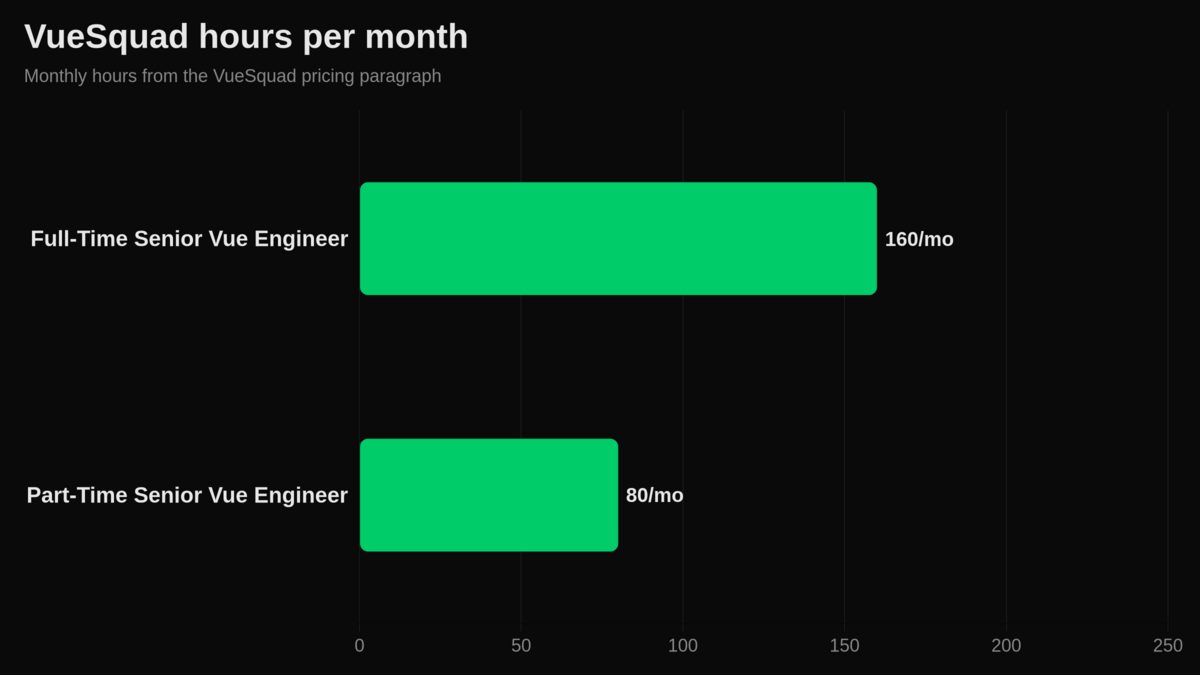
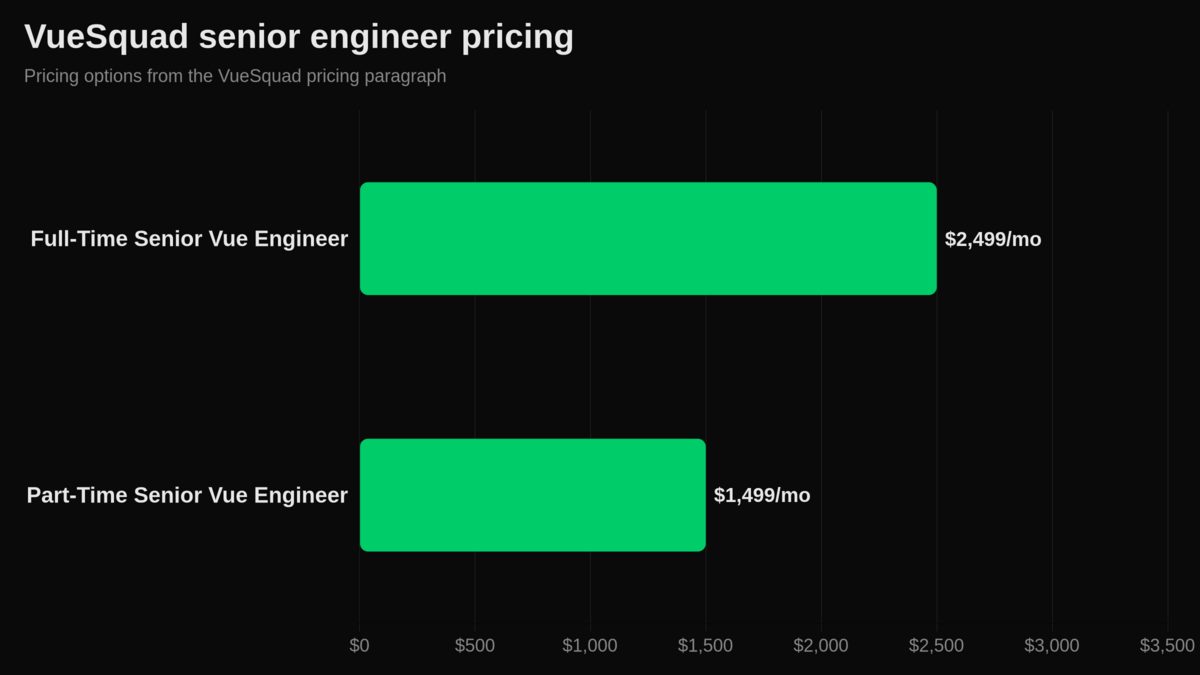
VueSquad provides senior Vue and Nuxt engineers only. Our Full-Time Senior Vue Engineer plan is $2,499 per month for 160 hours per month, our Part-Time Senior Vue Engineer plan is $1,499 per month for 80 hours per month, and Dedicated Vue Squad uses custom pricing. You can review VueSquad pricing and engagement models or hire senior Vue and Nuxt engineers if your internal team needs capacity.
We are not the right choice if your team only needs a one-file fix and already has the time to do it. We are a fit when Nuxt migration work is blocking roadmap work, or when you need a senior engineer embedded in the product team through a Nuxt migration engagement.
Next step: make Nuxt 5 boring before release day
Do not wait for the final Nuxt 5 release to find your blockers. Audit server imports, route casing, sessions, modules, and deployment mode now.
If your team is busy with product work, start with a small compatibility branch and a clear owner. If you need senior Nuxt help inside your roadmap, VueSquad can support the migration through our Nuxt migration help.
Frequently asked questions
When is the Nuxt 5 release date?
There is no exact confirmed release day. Use the estimated window at the top of the article for planning, not for a locked delivery promise.
Is Nuxt 5 nightly available?
Yes. Nuxt’s nightly docs identify the nuxt-nightly@5x channel for the next major line in the nightly release channel. Use it for testing branches, not production.
Should I upgrade my Nuxt 2 SaaS to Nuxt 4 or wait for Nuxt 5?
Do not wait by default. First check app health, dependency paths, server code, modules, and deployment mode. If the product is stable, an in-place path is often safer. If the architecture is already hard to change, a fresh codebase may be the better business decision.
Will there be breaking changes when moving from Nuxt 4 to Nuxt 5?
Yes. The documented areas include server runtime behavior, routing, imports, sessions, and modules. The point is not to fear them. Test the known parts early and keep the hard work visible.
Is Nuxt 4 ready for production use?
Nuxt says it supports each major line for at least half a year after the next major release and provides an upgrade path in its roadmap policy. For a product team, the better question is whether your app, modules, tests, and deployment setup are ready.
Should I use nuxt generate or nuxt build?
Use nuxt generate only when static output fits the product. Use nuxt build when the app needs server functionality at runtime. This matters during migration because server endpoints, sessions, and dynamic rendering can be missed if you test only static output.